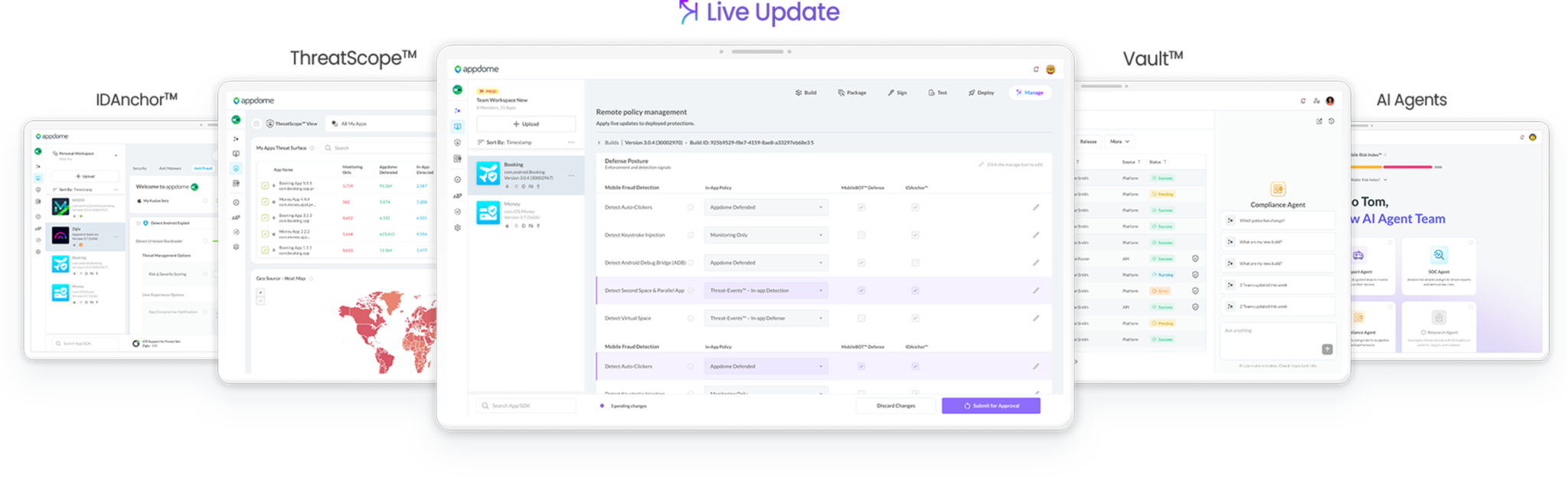
Introducing Live Update

Deploy & Update Security Policies in Real-Time

Appdome’s Live Update allows mobile brands to deploy and update security, anti-fraud, anti-bot, and device fingerprinting policies to Android & iOS apps in real time, skipping the need for a new app build or release. Deploy and update security policies at the app, release, audience or user level with ease. 

Liveupdate Persona

Real-Time Protection for Apps & Users

Deploy and Update Security Policies on Demand

Deploy Protections in
Running Mobile Apps

Use Live Update to add or change the security policies in live, running, production mobile applications without building or publishing a new release. Respond to emerging threats and changing business needs, updating everything from enforcement to configuration, messaging, and intelligence functions running inside an Appdome-protected mobile application.

Learn More >

Update Policies by App,
Release, Audience or Users

Appdome's Live Update gives mobile brands unparalleled and granular control over the security policies deployed in live running mobile applications. Use Live Update to change the security, message, or enforcement policies by mobile application, release, audience segments, or individual devices and users to match threats and business needs fast.

Learn More >

Preserve Governance &
Control over ALL Live Updates

Live Updates are made available via the Appdome platform using an enterprise grade Request-Approve-Publish workflow that requires different stakeholders to validate each live update before it goes live. See when Live Updates are published, block unwanted or risky updates, and maintain a complete audit trail of every production change.

Learn More >

With Live Update, we pushed a certificate update and policy change to a targeted segment of our audience without building a new release.”

Ciso Digital Platform

Push a Security Update without a Release

A compromised certificate, new attack pattern, or unexpected production issue shouldn't force you into another mobile release cycle. With Live Update, security teams can respond directly from Appdome and push approved policy changes to deployed apps — turning a process that can take days into an operational response that can happen in minutes.

Weeks

Traditional mobile security cycle

Days

Compressed release sprint

Hours

Emergency release effort

Minutes

Live Update of Security Policy

Live, Targeted Security & Fraud Control

Appdome's Live Update connects runtime governance to the product experience running inside live mobile apps. With Live Update, you can push a new or updated security, anti-fraud, bot defense, or AI access policy live to any segment or all of your mobile users in real time. One authorized user configures and submits the change. A different authorized user reviews and approves it. Then, publish to production directly on Appdome (without an app release).

Full App & Audience Targeting

With Live Update, you can push new and updated security, anti-fraud, bot defense, or AI access policies to specific segments of your mobile audience or all versions of your mobile app. Push updates by device, model, OS version, architecture, region, app, release, or other criteria, and adjust threat enforcement for a specific audience or use case without a new release.

Learn How >

Complete Mobile Policy Control

Appdome's Live Update allows its users to push a policy update to live, running applications across Appdome's full protection inventory, including 400+ mobile app security, RASP, anti-malware, anti-fraud, bot defense, and AI threats, AI Access, Device Identity, and Reputation controls. Organizations can enable new protections, upgrade/downgrade enforcement, and turn on/off intelligence and risk signals without pushing a new release.

Learn How >

Enterprise Guardrails & Audit Trails

Every Live Update follows a controlled approval workflow in which different users request, approve, and publish changes, thereby ensuring full enterprise visibility and governance. Each policy update is recorded in Vault, including what changed, who made the change, when, and which apps and audiences were affected, providing an instant and continous audit trail for all live updates.

Learn How >

Autonomous Policy Synchronization

The Appdome platform keeps Live Update policies and Build Profile policies aligned, so that the overall security model remains intact. Changes made through Live Update can carry into the next release, and Build Profile changes can reach apps already in use, so published apps and future releases share one consistent protection policy. This is done autonmously by Appdome's Build Agent, so no work required.

Learn How >

AI Compliance Agent

Live Update is supported by Appdome's on-platform Compliance Agent, an agentic evaluation agent that monitors your security, anti-fraud, and other protection policies and notifies you if any change or drift in your controls exposes the business to risks, non-compliance, and regulatory issues.

Learn How >

Secure Live Update Channel

Appdome delivers every Live Update over a secure channel between the protected app and the Live Update backend. Each update is encrypted and integrity-validated so it can't be read or altered in transit, and can be bound to its intended device.

Learn How >

Unified Mobile App Protection
from Build Time to Real-Time

Appdome Live Update is fully integrated with other Appdome workstreams, operating within a common Appdome framework of platform visibility, management, and control to ensure that each mobile brand's protection policies don't degrade, fall out of sync, or drift from the business's needs. Live updates are checked against established build policies, posted to Vault™ and evaluated by Appdome's agentic workers to ensure continuous compliance througout the mobiel brand's lifecycle

Live Update Slide
KB Appdome platform/ Appdome Certified Secur

Explore Live Update Knowledge Base

Use these step-by-step guides to learn how to use Appdome Live Update to respond to active threats and update security configurations in your Android and iOS apps without waiting for a new app release. Each Live Update knowledge base article explains how to request, review, approve, and deploy supported configuration changes while maintaining governance and separation of duties. Advanced topics include managing Live Update policies, understanding supported updates, validating changes, tracking deployment status and history, and using Live Update as part of your broader mobile app security operations.

Search Appdome Solutions

Search
Mobile Security Can't Move At App Release Speed Anymore

Mobile Security Can’t Move at App Release Speed Anymore

Traditional App Release cycles can’t keep pace with AI-driven threats. Discover why mobile security must evolve beyond build-time protection to enable continuous, real-time defense without rebuilding or republishing apps.