How to Detect Adversarial Embedding Attacks in iOS Apps Using AI
This Knowledge Base article describes how to use Appdome’s AI in your CI/CD pipeline to continuously deliver plugins that Detect Adversarial Embedding Attack in iOS apps.
How to Detect Adversarial Embedding Attacks in iOS Apps?
How Appdome Detects Adversarial Embedding Attacks in iOS Apps?
Prerequisites for Using Appdome's Detect Adversarial Embedding Attack Plugins:
To use Appdome’s mobile app security build system to Detect Adversarial Embedding Attack , you’ll need:
- Appdome account (create a free Appdome account here)
- A license for Detect Adversarial Embedding Attack
- Mobile App (.ipa for iOS)
- Signing Credentials (see Signing Secure Android apps and Signing Secure iOS apps)
How to Implement Detect Adversarial Embedding Attack in iOS Apps Using Appdome
On Appdome, follow these 3 simple steps to create self-defending iOS Apps that Detect Adversarial Embedding Attack without an SDK or gateway:
-
Designate the Mobile App to be protected.
-
Upload an app via the Appdome Mobile Defense platform GUI or via Appdome’s DEV-API or CI/CD Plugins.
-
iOS Formats: .ipa
-
Detect Adversarial Embedding Attack is compatible with: Obj-C, Java, Swift, Flutter, React Native, Unity, Xamarin, Cordova and other iOS apps.
-
-
Select the defense: Detect Adversarial Embedding Attack.
-
-
Follow the steps in Sections 2.2-2.2.2 of this article to add the Detect Adversarial Embedding Attack feature to your Fusion Set via the Appdome Console.
-
When you enable Deepfake Video Detection you'll notice that the Fusion Set you created in step 2.1 now bears the icon of the protection category that contains Detect Adversarial Embedding Attack.

Figure 2: Fusion Set that displays the newly added Detect Adversarial Embedding Attack protection
Note: Annotating the Fusion Set to identify the protection(s) selected is optional only (not mandatory). -
Open the Fusion Set Detail Summary by clicking the “...” symbol on the far-right corner of the Fusion Set. Copy the Fusion Set ID from the Fusion Set Detail Summary (as shown below):
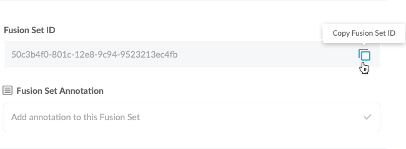
Figure 3: Fusion Set Detail Summary
-
Follow the instructions below to use the Fusion Set ID inside any standard mobile DevOps or CI/CD toolkit like Bitrise, Jenkins, Travis, Team City, Circle CI or other system:
-
Refer to the Appdome API Reference Guide for API building instructions.
-
Look for sample APIs in Appdome’s GitHub Repository.
-
Create and name the Fusion Set (security template) that will contain the Detect Adversarial Embedding Attack feature as shown below:
Figure 1: Fusion Set that will contain the Detect Adversarial Embedding Attack feature
-
-
Add the Detect Adversarial Embedding Attack feature to your security template.
-
Navigate to Build > Anti ATO tab > Deepfake Detection section in the Appdome Console.
-
Toggle On Deepfake Video Detection > Detect Adversarial Embedding Attack.
(a) Choose to monitor this attack vector by checking the Threat Events checkbox associated with Detect Adversarial Embedding Attack as shown below.
(b) To receive mobile Threat Monitoring, check the ThreatScope™ box as shown below. For more details, see our knowledge base article on ThreatScope™ Mobile XTM.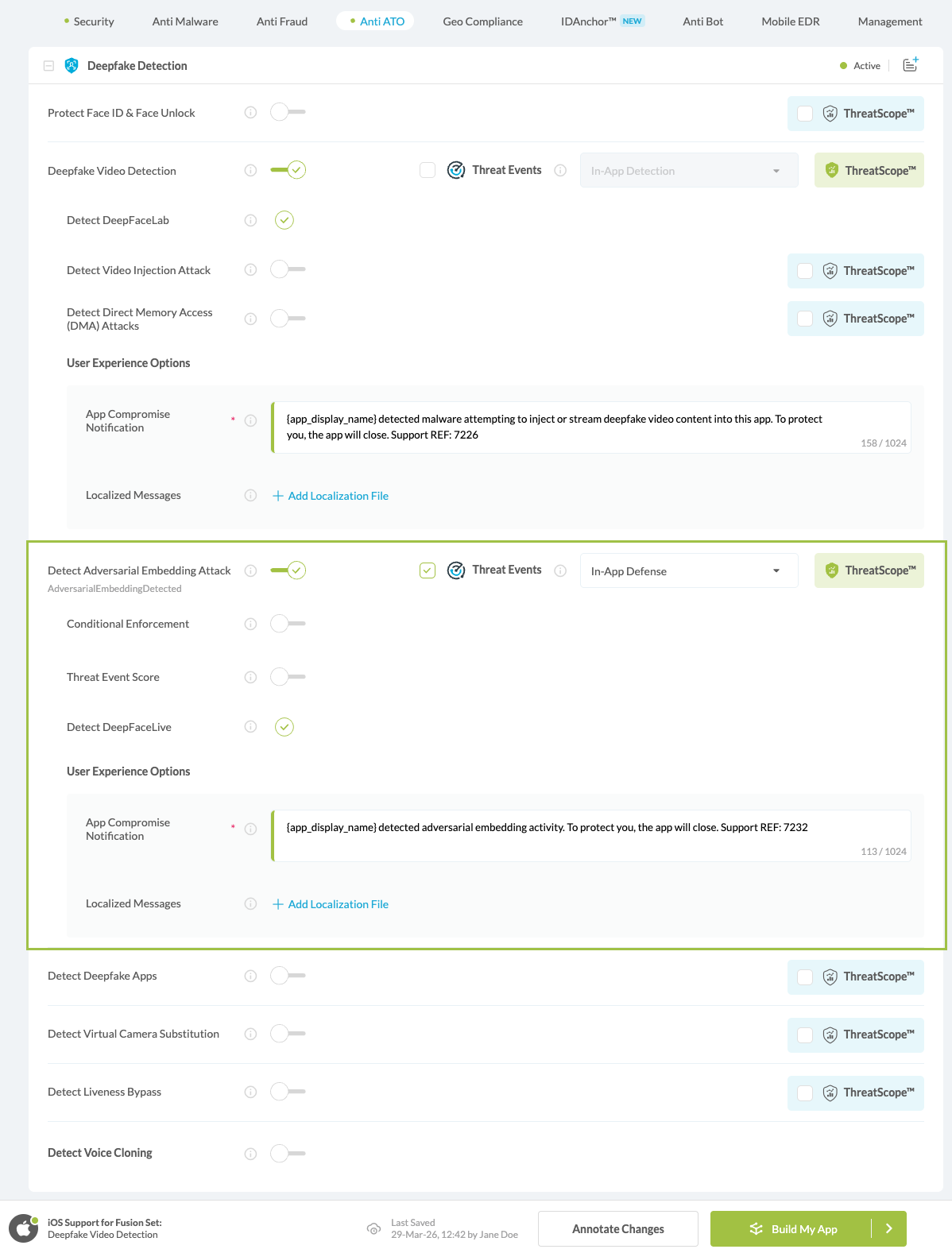
Figure 4: Selecting Detect Adversarial Embedding Attack
Note: The Appdome Platform displays the Mobile Operation Systems supported by each defense in real-time. For more details, see our OS Support Policy KB. -
Select the Threat-Event™ in-app mobile Threat Defense and Intelligence policy for Detect Adversarial Embedding Attack:
-
Threat-Events™ OFF > In-App Defense
If the Threat-Events™ setting is not selected. Appdome will detect and defend user and app by enforcing Detect Adversarial Embedding Attack.
-
Threat-Events™ ON > In-App Detection
When this setting is used, Appdome detects Adversarial Embedding Attack and passes Appdome’s Threat-Event™ attack intelligence to the app’s business logic for processing, enforcement, and user notification. For more information on consuming and using Appdome Threat-Events™ in the app, see section Using Threat-Events™ for Detect Adversarial Embedding Attack Intelligence and Control in Mobile Apps.
-
Threat-Events™ ON > In-App Defense
When this setting is used, Appdome detects and defends against Adversarial Embedding Attack (same as Appdome Enforce) and passes Appdome’s Threat-Event™ attack intelligence to the app’s business logic for processing. For more information on consuming and using Appdome Threat-Events™ in the app, see section Using Threat-Events™ for Detect Adversarial Embedding Attack Intelligence and Control in Mobile Apps.
-
-
Configure the User Experience Options for Detect Adversarial Embedding Attack:
With Threat-Events™ OFF, Appdome provides several user experience options for mobile brands and developers.- App Compromise Notification: Customize the pop-up or toast Appdome uses to notify the user when a threat is present while using the protected mobile app.
- Short message Option. This is available for mobile devices that allow a banner notification for security events.
-
Localized Message Option. Allows Appdome users to support global languages in security notifications.
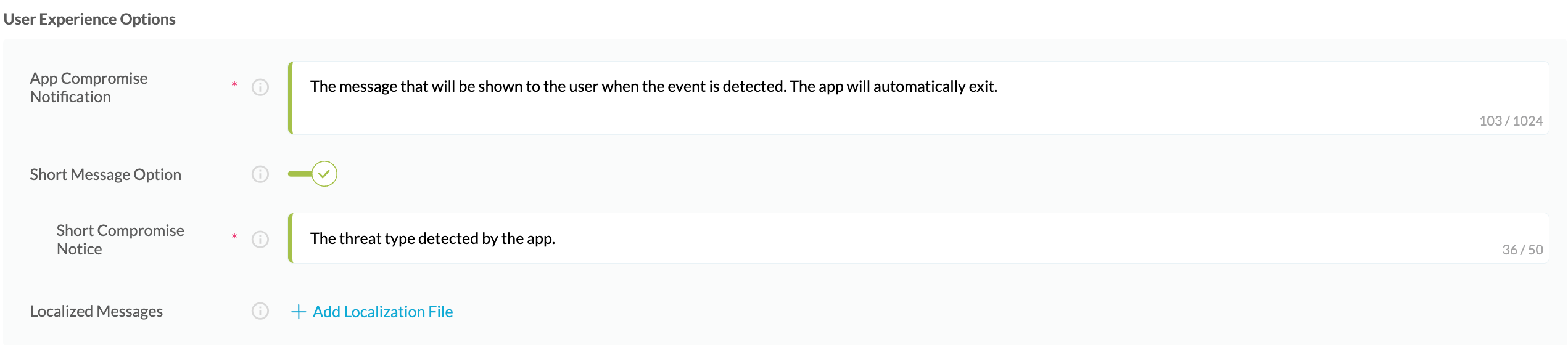
Figure 5: Default User Experience Options for Appdome’s Adversarial Embedding Attack
-
Detect Adversarial Embedding Attack Threat Code™. Appdome uses AI to generate a unique code each time Detect Adversarial Embedding Attack is triggered by an active threat on the mobile device. Use the code in Appdome Threat Resolution Center™ to help end users identify, find and resolve active threats on the personal mobile devices.
-
Congratulations! The Detect Adversarial Embedding Attack protection is now added to the mobile app -
-
Certify the Detect Adversarial Embedding Attack feature in iOS Apps
After building Detect Adversarial Embedding Attack, Appdome generates a Certified Secure™ certificate to guarantee that the Detect Adversarial Embedding Attack protection has been added and is protecting the app. To verify that the Detect Adversarial Embedding Attack protection has been added to the mobile app, locate the protection in the Certified Secure™ certificate as shown below:
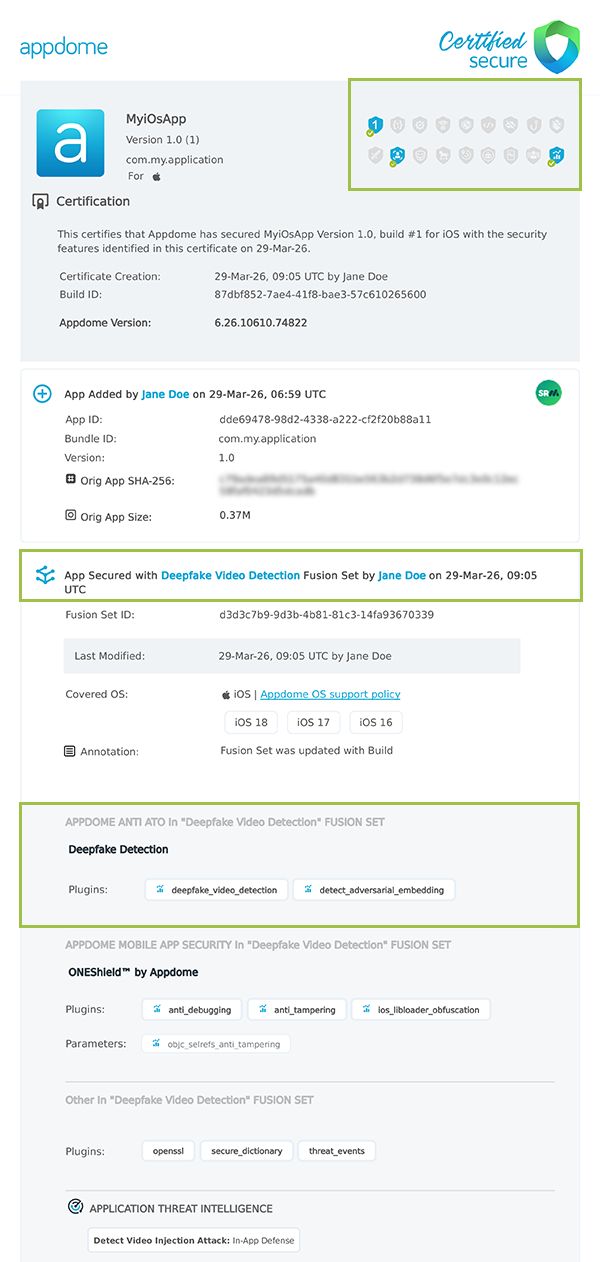
Figure 6: Certified Secure™ certificate
Each Certified Secure™ certificate provides DevOps and DevSecOps organizations the entire workflow summary, audit trail of each build, and proof of protection that Detect Adversarial Embedding Attack has been added to each iOS app. Certified Secure provides instant and in-line DevSecOps compliance certification that Detect Adversarial Embedding Attack and other mobile app security features are in each build of the mobile app.
Using Threat-Events™ for Adversarial Embedding Attack Intelligence and Control in iOS Apps
Appdome Threat-Events™ provides consumable in-app mobile app attack intelligence and defense control when Adversarial Embedding Attack are detected. To consume and use Threat-Events™ for Adversarial Embedding Attack in iOS Apps, use AddObserverForName in Notification Center, and the code samples for Threat-Events™ for Adversarial Embedding Attack shown below.
The specifications and options for Threat-Events™ for Adversarial Embedding Attack are:
| Threat-Event™ Elements | Detect Adversarial Embedding Attack Method Detail |
|---|---|
| Appdome Feature Name | Detect Adversarial Embedding Attack |
| Threat-Event Mode | |
| OFF, IN-APP DEFENSE | Appdome detects, defends and notifies user (standard OS dialog) using customizable messaging. |
| ON, IN-APP DETECTION | Appdome detects the attack or threat and passes the event in a standard format to the app for processing (app chooses how and when to enforce). |
| ON, IN-APP DEFENSE | Uses Appdome Enforce mode for any attack or threat and passes the event in a standard format to the app for processing (gather intel on attacks and threats without losing any protection). |
| Certified Secure™ Threat Event Check | |
| Visible in ThreatScope™ | |
| Developer Parameters for Detecting Adversarial Embedding Attack Threat-Event™ | |
| Threat-Event NAME | AdversarialEmbeddingDetected |
| Threat-Event DATA | reasonData |
| Threat-Event CODE | reasonCode |
| Threat-Event REF | 7232 |
| Threat-Event SCORE | |
| currentThreatEventScore | Current Threat-Event score |
| threatEventsScore | Total Threat-events score |
| Threat-Event Context Keys | |
|---|---|
| Timestamp | The exact time the threat event was triggered, recorded in milliseconds since epoch |
| message | Message displayed for the user on event |
| externalID | The external ID of the event which can be listened via Threat Events |
| osVersion | OS version of the current device |
| deviceModel | Current device model |
| deviceManufacturer | The manufacturer of the current device |
| fusedAppToken | The task ID of the Appdome fusion of the currently running app |
| kernelInfo | Info about the kernel: system name, node name, release, version and machine. |
| deviceID | Current device ID |
| reasonCode | Reason code of the occurred event |
| threatCode | The last six characters of the threat code specify the OS, allowing the Threat Resolution Center to address the attack on the affected device. |
With Threat-Events™ enabled (turned ON), iOS developers can get detailed attack intelligence and granular defense control in iOS applications and create amazing user experiences for all mobile end users when Adversarial Embedding Attack are detected.
The following is a code sample for native iOS apps, which uses all values in the specification above for Detect Adversarial Embedding Attack:
Important! Replace all placeholder instances of <Context Key> with the specific name of your threat event context key across all language examples. This is crucial to ensure your code functions correctly with the intended event data. For example, The <Context Key> could be the message, externalID, OS Version, reason code, etc.
x
let center = NotificationCenter.defaultcenter.addObserver(forName: Notification.Name("AdversarialEmbeddingDetected"), object: nil, queue: nil) { (note) in guard let usrInf = note.userInfo else { return } let message = usrInf["message"]; // Message shown to the user let reasonData = usrInf["reasonData"]; // Threat detection cause let reasonCode = usrInf["reasonCode"]; // Event reason code // Current threat event score let currentThreatEventScore = usrInf["currentThreatEventScore"]; // Total threat events score let threatEventsScore = usrInf["threatEventsScore"]; // Replace '<Context Key>' with your specific event context key // let variable = usrInf["<Context Key>"]; // Your logic goes here (Send data to Splunk/Dynatrace/Show Popup...)}xxxxxxxxxx[[NSNotificationCenter defaultCenter] addObserverForName: @"AdversarialEmbeddingDetected" object:nil queue:nil usingBlock:^(NSNotification *org_note) { __block NSNotification *note = org_note; dispatch_async(dispatch_get_main_queue(), ^(void) { // Message shown to the user NSString *message = [[note userInfo] objectForKey:@"message"]; // Threat detection cause NSString *reasonData = [[note userInfo] objectForKey:@"reasonData"]; // Event reason code NSString *reasonCode = [[note userInfo] objectForKey:@"reasonCode"]; // Current threat event score NSString *currentThreatEventScore = [[note userInfo] objectForKey:@"currentThreatEventScore"]; // Total threat events score NSString *threatEventsScore = [[note userInfo] objectForKey:@"threatEventsScore"]; // Replace '<Context Key>' with your specific event context key // NSString *variable = [[note userInfo] objectForKey:@"<Context Key>"]; // Your logic goes here (Send data to Splunk/Dynatrace/Show Popup...) });}];xxxxxxxxxxconst { ADDevEvents } = NativeModules;const aDDevEvents = new NativeEventEmitter(ADDevEvents);function registerToDevEvent(action, callback) { NativeModules.ADDevEvents.registerForDevEvent(action); aDDevEvents.addListener(action, callback);}export function registerToAllEvents() { registerToDevEvent( "AdversarialEmbeddingDetected", (userinfo) => Alert.alert(JSON.stringify(userinfo)) var message = userinfo["message"] // Message shown to the user var reasonData = userinfo["reasonData"] // Threat detection cause var reasonCode = userinfo["reasonCode"] // Event reason code // Current threat event score var currentThreatEventScore = userinfo["currentThreatEventScore"] // Total threat events score var threatEventsScore = userinfo["threatEventsScore"] // Replace '<Context Key>' with your specific event context key // var variable = userinfo["<Context Key>"] // Your logic goes here (Send data to Splunk/Dynatrace/Show Popup...) );}x
RegisterReceiver(new ThreatEventReceiver(), new IntentFilter("AdversarialEmbeddingDetected")); class ThreatEventReceiver : BroadcastReceiver{ public override void OnReceive(Context context, Intent intent) { // Message shown to the user String message = intent.GetStringExtra("message"); // Threat detection cause String reasonData = intent.GetStringExtra("reasonData"); // Event reason code String reasonCode = intent.GetStringExtra("reasonCode"); // Current threat event score String currentThreatEventScore = intent.GetStringExtra("currentThreatEventScore"); // Total threat events score String threatEventsScore = intent.GetStringExtra("threatEventsScore"); // Replace '<Context Key>' with your specific event context key // String variable = intent.GetStringExtra("<Context Key>"); // Your logic goes here (Send data to Splunk/Dynatrace/Show Popup...) }}x
NSNotificationCenter.DefaultCenter.AddObserver( (NSString)"AdversarialEmbeddingDetected", // Threat-Event Identifier delegate (NSNotification notification) { // Message shown to the user var message = notification.UserInfo.ObjectForKey("message"); // Threat detection cause var reasonData = notification.UserInfo.ObjectForKey("reasonData"); // Event reason code var reasonCode = notification.UserInfo.ObjectForKey("reasonCode"); // Current threat event score var currentThreatEventScore = notification.UserInfo.ObjectForKey("currentThreatEventScore"); // Total threat events score var threatEventsScore = notification.UserInfo.ObjectForKey("threatEventsScore"); // Replace '<Context Key>' with your specific event context key // var variable = notification.UserInfo.ObjectForKey("<Context Keys>"); // Your logic goes here (Send data to Splunk/Dynatrace/Show Popup...) });xxxxxxxxxxwindow.broadcaster.addEventListener("AdversarialEmbeddingDetected", function(userInfo) { var message = userInfo.message // Message shown to the user var reasonData = userInfo.reasonData // Threat detection cause var reasonCode = userInfo.reasonCode // Event reason code // Current threat event score var currentThreatEventScore = userInfo.currentThreatEventScore // Total threat events score var threatEventsScore = userInfo.threatEventsScore // Replace '<Context Key>' with your specific event context key // var variable = userInfo.<Context Keys> // Your logic goes here (Send data to Splunk/Dynatrace/Show Popup...)});x
import 'dart:async';import 'package:flutter/material.dart';import 'package:flutter/services.dart';class PlatformChannel extends StatefulWidget { const PlatformChannel({super.key}); State<PlatformChannel> createState() => _PlatformChannelState();}class _PlatformChannelState extends State<PlatformChannel> { // Replace with your EventChannel name static const String _eventChannelName = "AdversarialEmbeddingDetected"; static const EventChannel _eventChannel = EventChannel(_eventChannelName); void initState() { super.initState(); _eventChannel.receiveBroadcastStream().listen(_onEvent, onError: _onError); } void _onEvent(Object? event) { setState(() { // Adapt this section based on your specific event data structure var eventData = event as Map; // Example: Accessing 'externalID' field from the event var externalID = eventData['externalID']; // Customize the rest of the fields based on your event structure String message = eventData['message']; // Message shown to the user String reasonData = eventData['reasonData']; // Threat detection cause String reasonCode = eventData['reasonCode']; // Event reason code // Current threat event score String currentThreatEventScore = eventData['currentThreatEventScore']; // Total threat events score String threatEventsScore = eventData['threatEventsScore']; // Replace '<Context Key>' with your specific event context key // String variable = eventData['<Context Keys>']; }); } // Your logic goes here (Send data to Splunk/Dynatrace/Show Popup...)}Using Appdome, there are no development or coding prerequisites to build secured iOS Apps by using Detect Adversarial Embedding Attack. There is no SDK and no library to code or implement in the app and no gateway to deploy in your network. All protections are built into each app and the resulting app is self-defending and self-protecting.
Releasing and Publishing Mobile Apps with Detect Adversarial Embedding Attack
After successfully securing your app by using Appdome, there are several available options to complete your project, depending on your app lifecycle or workflow. These include:
- Customizing, Configuring & Branding Secure Mobile Apps.
- Deploying/Publishing Secure mobile apps to Public or Private app stores.
- Releasing Secured Android & iOS Apps built on Appdome.
Related Articles:
- How to Detect Adversarial Embedding Attacks in Android Apps Using AI
- How to Detect Deepfake Apps in Android and iOS
- How to Detect Deepfake Video Attacks in Android Apps
- How to Detect Liveness Bypass in Android Apps
How Do I Learn More?
If you have any questions, please send them our way at support.appdome.com or via the chat window on the Appdome platform.
Thank you!
Thanks for visiting Appdome! Our mission is to secure every app on the planet by making mobile app security easy. We hope we’re living up to the mission with your project.