How to Use Certificate Pinning Schemes in Mobile Apps Using AI
This Knowledge Base article describes how to use Appdome’s AI in your CI/CD pipeline to continuously deliver plugins that implement Certificate Pinning Schemes (aka: profiles) in Android and iOS apps to prevent MitM attacks. This article describes the Certificate Pinning Schemes that can be configured on Appdome.
What Are Certificate Pinning Schemes?
Certificate Pinning Schemes define how mobile apps validate SSL/TLS certificates to prevent Man-in-the-Middle (MitM) attacks and ensure secure communication with trusted servers. Attackers may intercept encrypted traffic using fraudulent certificates, compromised Certificate Authorities (CAs), or malicious proxies to decrypt sensitive data. By implementing certificate pinning, apps verify server authenticity based on predefined certificates or cryptographic properties, blocking unauthorized or rogue connections. Without proper certificate pinning, apps remain vulnerable to network-based threats, increasing the risk of data interception, credential theft, and regulatory non-compliance in financial, healthcare, and enterprise applications.
How Appdome Protects Mobile Apps With Certificate Pinning Schemes
Appdome’s dynamic Certificate Pinning Schemes plugins enforce SSL/TLS certificate pinning in Android and iOS apps, securing app-to-server communications against MitM attacks. Using AI-driven automation, Appdome applies pinning without manual coding, SDKs, or server modifications. The plugins offers multiple pinning profiles to meet different security and operational requirements.
To select a pinning scheme:
Refer to the relevant section below (Security or Anti Bot tabs)
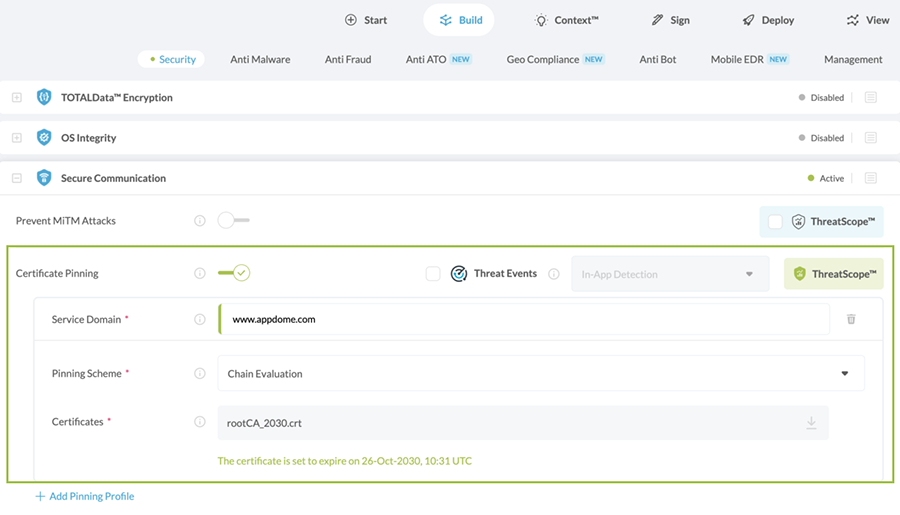
In the Security Tab:
- Go to the Security tab > Secure Communication section.
- Enable (toggle On) Certificate Pinning.
- Click +Add Pinning Profile.
- Next to “Pinning Scheme”, select the relevant Scheme from the drop-down list.
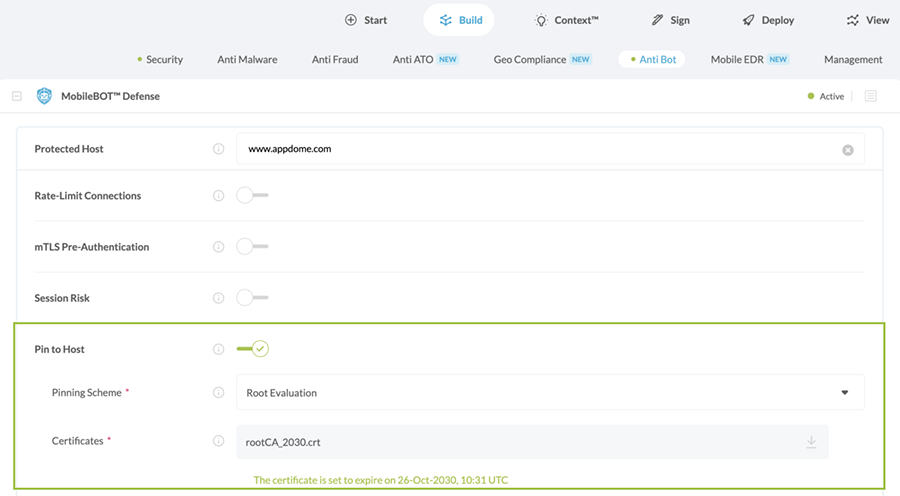
In the Anti Bot Tab:
- Go to the Anti Bot tab > MobileBOT™ Defense section.
- Enable (toggle On) Pin to Host.
- Next to “Pinning Scheme”, select the relevant Scheme from the drop-down list.
Certificate Pinning Profiles/Schemes
Appdome offers the following mutually exclusive pinning schemes (pinning profiles) to implement Certificate Pinning in any iOS or Android app:
- Chain Evaluation – Verifies the full chain of trust using the Root and Intermediate Certificates uploaded to Appdome. Only intermediate and leaf certificates that chain back to the uploaded certificates are trusted, effectively locking the chain of trust. Any mismatch triggers a security event.
-
Certificate format: PEM (Base64) or DER
-
Required certificates: Root + Intermediate or Root + Leaf
-
Multiple certificates: Upload all required certificates in a single
.zipfile -
Do not use: Certificate bundle files (multiple certificates in a single file)
-
- Strict Evaluation – Verifies the exact fingerprint of the server (leaf) certificate against the certificate returned by the server. This is equivalent to leaf certificate pinning. Any mismatch triggers a security event.
-
Certificate format: PEM (Base64) or DER
-
Required certificates: Leaf (server) certificate only
-
Multiple certificates: Upload all required certificates in a single
.zipfile (if using multiple endpoints) -
Do not use: Root or intermediate certificates
-
- Root Evaluation – Verifies that the root CA returned by the server for the specified domain (FQDN) matches the Root CA certificate uploaded to Appdome. This approach allows intermediate and leaf certificates to change without requiring updates to the app. Any mismatch triggers a security event.
-
Certificate format: PEM (Base64) or DER
-
Required certificates: Root certificate only
-
Multiple certificates: Upload all required certificates in a single
.zipfile (if applicable) -
Do not use: Intermediate or leaf certificates
-
- Public Key Evaluation – Verifies the public key of the server certificate. This allows certificate renewal without impacting trust, as long as the new certificate uses the same public key.
- Certificate format: PEM (Base64) or DER
- Required certificates: Server certificate (leaf) containing the public key
- Multiple certificates: Upload all required certificates in a single
.zipfile (if applicable) - Do not use: Root or intermediate certificates only (must include the server certificate with the public key)
- No Pinning – Appdome does not enforce certificate pinning. Certificate validation falls back to the operating system’s default verification process.
After selecting a pinning scheme, upload the required certificate(s) (Root CA, Intermediate, or server/leaf certificate) as a file or ZIP archive (.cer, .crt, .pem, .der, .zip). Multiple certificates can be included to support certificate rotation and ensure continuity of service while maintaining protection against Man-in-the-Middle (MitM) attacks.
Security Tab: Pinning Control
In the Security tab, developers can further enhance SSL/TLS security with additional enforcement options:

- Enforce Certificate Roles
Enforce network connections to verify ‘basicConstraints’ extension in the certificate chain. - Enforce Strong RSA Signature
Enforce server certificate signatures to use a Rivest-Shamir-Adleman (RSA) key with a length of at least 2048 bits. - Enforce Strong ECC Signature
Enforce server certificate signatures to use Elliptic-Curve Cryptography (ECC) key with a size of at least 256 bits. - Enforce SHA256 Digest
Enforce server certificate signatures to use at least a SHA256 certificate hashing algorithm.
Unlike static implementations, Appdome’s CI/CD-integrated approach continuously adapts to SSL/TLS security needs, allowing organizations to enforce enterprise-grade protections without disrupting app functionality.
Related articles:
- How to Block Mobile Bots with Client Certificates, Authenticate Legitimate Mobile Apps
- How to Block Mobile Bots Using Session & Header Secrets
- How to Encrypt Shared Preferences in Android apps
- How to Connect to Trusted Mobile Hosts with URL Whitelisting on Android & iOS Apps
Thank you!
Thanks for visiting Appdome! Our mission is to secure every app on the planet by making mobile app security easy. We hope we’re living up to the mission with your project. If you don’t already have an account, you can sign up for free.