Thank you!
Thanks for visiting Appdome! Our mission is to make mobile integration easy. We hope we’re living up to the mission with your project.

This knowledge base article shows you how easy it is to use Appdome Threat-Events™ to get in-app threat intelligence in React Native Apps and control the user experience in your React Native Apps when mobile attacks occur.
Appdome supports integration with both the Legacy React Native Architecture and the New React Native Architecture (TurboModules). As React Native gradually transitions to the New Architecture, adoption depends on app readiness and third-party library compatibility. To ensure stability, Appdome recommends using the Legacy Architecture unless the New Architecture is fully supported and officially recommended for your app environment.
Appdome Threat-Events is a powerful threat-intelligence framework for Android & iOS apps, which is comprised of three elements: (1) a Threat Event, (2) the data from each Threat-Event, and (3) the Threat-Score™.
With Threat-Events, mobile developers can register, listen to, and consume real-time attack and threat data from Appdome’s mobile app security, anti-fraud, mobile anti-bot, and other protections within their mobile applications. This allows them to (1) ensure that mobile application workflows are aware of attacks and threats, (2) customize business logic and user experience based on the user’s risk profile and/or each attack or threat presented, and (3) pass the threat data to other record systems, such as app servers, mobile fraud analysis systems, SIEMs, and other data collection points.
The purpose of Threat-Events is to enable Android and iOS applications to adapt and respond to mobile app attacks and threats in real-time. Using Threat-Events will ensure the safety of users, data, and transactions.
Appdome Threat Events can be used as a stand-alone implementation in React Native Apps or in combination with Threat Scores. Threat Events provide the mobile developer with the in-app notification of each attack or threat and the metadata associated with the attack. Threat Scores provide the mobile developer with the Threat Event event score and the combined (aggregate) mobile end-user risk at the time of the notification.
The figure below shows where you can find Threat-Events and Threat-Scores for each of the runtime mobile app security, anti-fraud, anti-malware, mobile antibot, and other protections available on Appdome:
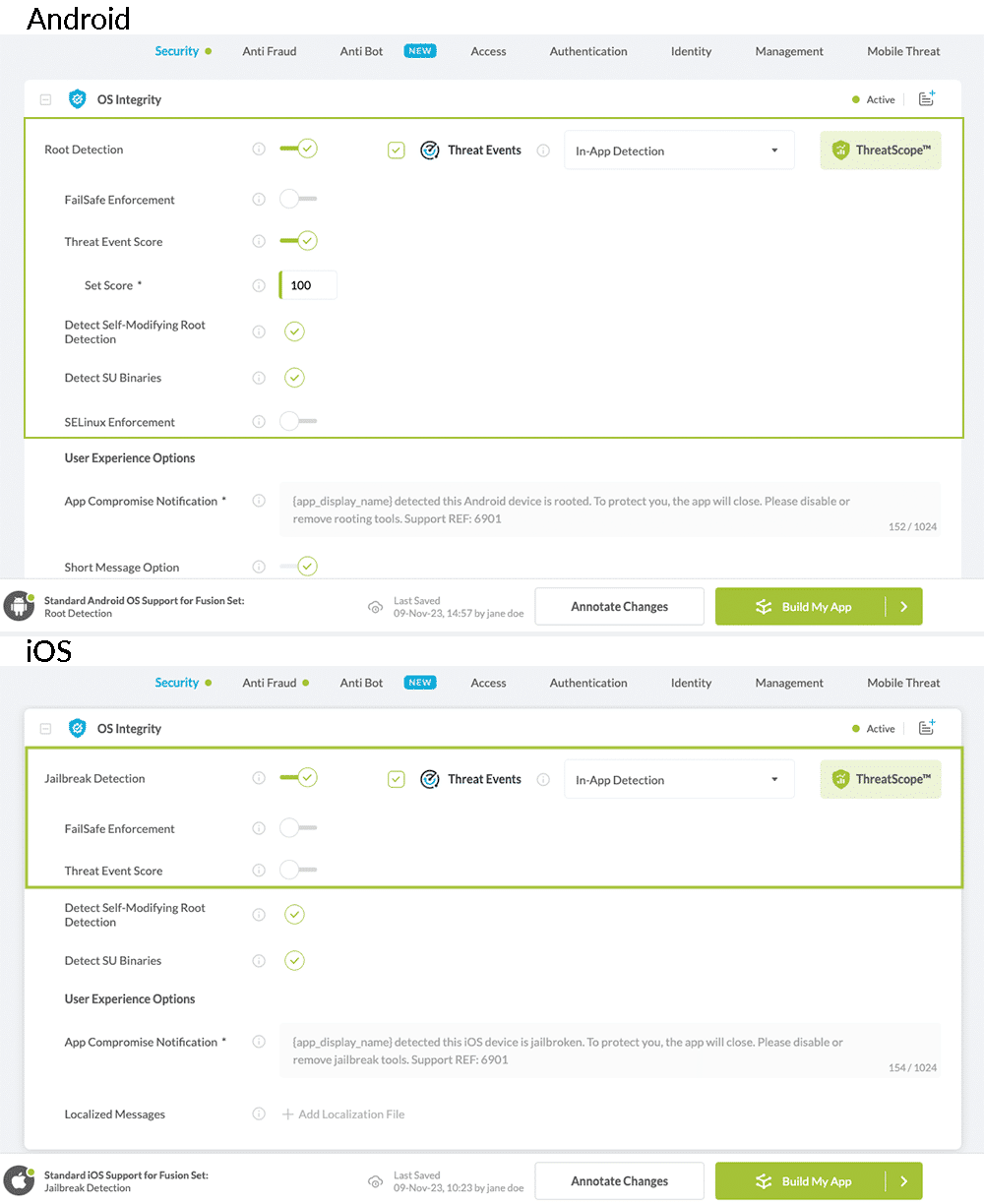
To enable Threat-Events with any runtime protection, select the check box next to Threat-Events for that feature. Doing so will enable (turn ON) Threat-Events for that feature. To enable Threat-Scores for any runtime protection, click the up/down arrow associated with Threat-Scores to assign a specific score to each protection.
Threat-Scores must have a value greater than zero (0) and less than a thousand (1,000).
Threat-Events and Threat-Scores can be used with or in place of server-based mobile anti-fraud solutions.
Here’s what you need to use Threat-Events with React Native Apps.
The Legacy Architecture is based on the JavaScript-to-native Bridge, where communication between JavaScript and native code occurs asynchronously through serialized messages. Native modules are implemented using RCTBridgeModule, and native-to-JavaScript events are delivered using RCTEventEmitter or NativeEventEmitter. Because all communication across the bridge is asynchronous and batched, this approach may introduce some overhead compared to newer architectures.
Before consuming Threat-Events or Threat-Scores in your React Native Apps, confirm that the following conditions are met:
Using Threat-Events™ and Threat-Scores™ in React Native Apps is different between iOS and Android.
#ifndef ADThreatEvents_h
#define ADThreatEvents_h

#import "React/RCTBridgeModule.h"
#import <React/RCTEventEmitter.h>

@interface ADThreatEvents : RCTEventEmitter
@property (strong) NSMutableArray *supportedEventsArray;
@end

#endif/* ADThreatEvents_h */
#import <Foundation/Foundation.h>
#import "ADThreatEvents.h"
#import "React/RCTBridgeModule.h"

@implementation ADThreatEvents
RCT_EXPORT_MODULE()
// This method can be called from js to register to event
RCT_EXPORT_METHOD(registerForThreatEvent:(NSString *)name ) {
    [[NSNotificationCenter defaultCenter] addObserver:self selector:@selector(handleNotification:) name:name object:nil];
    if (!self.supportedEventsArray) {
        self.supportedEventsArray = [NSMutableArray array];
    }
    [self.supportedEventsArray addObject:name];
}

// This method is needed to return all the events that will be called using sendEventWithName
- (NSArray *)supportedEvents
{
    return self.supportedEventsArray;
}

// This method will send notification to js
- (void)handleNotification:(NSNotification *)notification
{
    [self sendEventWithName:notification.name body:notification.userInfo];
}
@end
To register for Threat-Events, see the section Threat-Event Registration for iOS and Android React Native Apps
package com.reactnativedevevents;

import android.content.BroadcastReceiver;
import android.content.Context;
import android.content.Intent;
import android.content.IntentFilter;
import android.os.Bundle;
import android.util.Log;
import com.facebook.react.bridge.Arguments;
import com.facebook.react.bridge.ReactApplicationContext;
import com.facebook.react.bridge.ReactContextBaseJavaModule;
import com.facebook.react.bridge.ReactMethod;
import com.facebook.react.bridge.ReadableMap;
import com.facebook.react.bridge.WritableMap;
import com.facebook.react.modules.core.DeviceEventManagerModule;
import javax.annotation.Nonnull;

public class ADDevEvents extends ReactContextBaseJavaModule {

    public class ThreatEventReceiver extends BroadcastReceiver {

        @Override
        public void onReceive(Context context, Intent intent) {
            Log.i("Appdome", "recieved");
            handleNotification(intent);
        }

        private void handleNotification(Intent intent) {
            WritableMap extras = Arguments.fromBundle(intent.getExtras());
            getReactApplicationContext()
                    .getJSModule(DeviceEventManagerModule.RCTDeviceEventEmitter.class)
                    .emit(intent.getAction(), extras);
        }
    }
    private ThreatEventReceiver threatEventReceiver = new ThreatEventReceiver();

    public ADDevEvents(@Nonnull ReactApplicationContext reactContext) {
        super(reactContext);
    }

    @Nonnull
    @Override
    public String getName() {
        return "ADDevEvents";
    }

    @ReactMethod
    public void registerForDevEvent(String action) {
        IntentFilter filter = new IntentFilter(action);
        Log.i("Appdome", "registered");
        if (Build.VERSION.SDK_INT >= Build.VERSION_CODES.TIRAMISU) {
           this.getReactApplicationContext().registerReceiver(threatEventReceiver, filter, Context.RECEIVER_NOT_EXPORTED);
        } else {
           this.getReactApplicationContext().registerReceiver(threatEventReceiver, filter);
        }
    }

    @ReactMethod
    public void postDevEvent(String action, ReadableMap userInfo) {
        Intent intent = new Intent(action);
        if (userInfo != null) {
            Bundle bundle = Arguments.toBundle(userInfo);
            intent.putExtras(bundle);
        }
        this.getReactApplicationContext().sendBroadcast(intent);
    }
}import com.facebook.react.ReactPackage;
import com.facebook.react.bridge.NativeModule;
import com.facebook.react.bridge.ReactApplicationContext;
import com.facebook.react.uimanager.ViewManager;
import java.util.ArrayList;
import java.util.Collections;
import java.util.List;
import javax.annotation.Nonnull;
public class ADThreatEventsPackage implements ReactPackage {
@Nonnull
@Override
public List createNativeModules(@Nonnull ReactApplicationContext reactContext) {
List modules = new ArrayList<>();
modules.add(new ADThreatEvents(reactContext));
return modules;
}
@Nonnull
@Override
public List createViewManagers(@Nonnull ReactApplicationContext reactContext) {
return Collections.emptyList();
}
}
import android.app.Application;
import com.facebook.react.ReactApplication;
import com.facebook.react.ReactNativeHost;
import com.facebook.react.ReactPackage;
import com.facebook.react.shell.MainReactPackage;
import com.facebook.soloader.SoLoader;
import java.util.Arrays;
import java.util.List;

public class MainApplication extends Application implements ReactApplication {

    private final ReactNativeHost mReactNativeHost = new ReactNativeHost(this) {
        @Override
        public boolean getUseDeveloperSupport() {
        return BuildConfig.DEBUG;
        }

        @Override
        protected List getPackages() {
            return Arrays.asList(new MainReactPackage(), new ADThreatEventsPackage());
        }

        @Override
        protected String getJSMainModuleName() {
            return "index";
        }
    };

    @Override
    public ReactNativeHost getReactNativeHost() {
        return mReactNativeHost;
    }

    @Override
    public void onCreate() {
        super.onCreate();
        SoLoader.init(this,/* native exopackage */ false);
    }
}
To register for Threat-Events, see the section Threat-Event Registration for iOS and Android React Native Apps.
const { ADThreatEvents } = NativeModules;
const adThreatEvents = new NativeEventEmitter(ADThreatEvents);
function registerToThreatEvent(action, callback) {
    NativeModules.ADThreatEvents.registerForThreatEvent(action);
    adThreatEvents.addListener(action, callback);
}
The New Architecture is React Native’s modern native integration system built on TurboModules, JSI, and code generation. It enables direct communication between JavaScript and native code without relying on the legacy bridge, reducing serialization overhead and improving performance.
Native modules are implemented as TurboModules and accessed either synchronously or asynchronously via JSI. Native-to-JavaScript events are delivered using typed, codegen-based event emitters instead of NativeEventEmitter, providing improved type safety and cross-platform consistency.
In addition to the general prerequisites, ensure that:
Your React Native project is configured to use the New Architecture (TurboModules).
You are using a React Native version that supports TurboModules.
Your Android and/or iOS development environments are properly configured for the New Architecture.
The basic steps to integrate Threat-Events using TurboModules are:
Define a typed JavaScript specification for the native module.
Configure your dependency management system to run Codegen, which generates the required native interfaces from the specification.
Implement your application logic (JavaScript/TypeScript) using the generated module.
Implement the native platform code (Android and/or iOS) using the generated interfaces and integrate it with the React Native runtime.
React Native provides a tool called Codegen, which takes a specification written in TypeScript or Flow and generates platform-specific code for Android and iOS. The specification defines the methods and data types exchanged between native code and the React Native JavaScript runtime.
A Turbo Native Module consists of the specification, the generated Codegen interfaces, and the native implementation.
To create the specification file:
In the root folder of your app, create a new folder named specs
Inside this folder, create a new file named NativeADThreatEvents.ts
Implementation of the threatEvent specification:
// specs/NativeADThreatEvents.ts

import type { TurboModule, CodegenTypes } from 'react-native';
import { TurboModuleRegistry } from 'react-native';

export type ThreatEvent = {
  eventId: string;
  payload: {[key: string]: string | null} | null;
};

export interface Spec extends TurboModule {
  registerForThreatEvent(eventId: string): void;
  readonly onThreatEvent: CodegenTypes.EventEmitter<ThreatEvent>;
}

export default TurboModuleRegistry.getEnforcing<Spec>('NativeADThreatEvents');
The specification is consumed by React Native Codegen, which generates the required native interfaces and boilerplate code.
Update your project’s package.json to include the following top-level configuration:
"codegenConfig": {
    "name": "NativeADThreatEventsSpec",
    "type": "modules",
    "jsSrcsDir": "specs",
    "android": {
      "javaPackageName": "<your_package>.specs"
    },
    "ios": {
      "modulesProvider": {"NativeADThreatEvents": "RCTNativeADThreatEvents"}
    }
  }
Note: Replace “<your_package>” with your own Java package name.
Modify your App.tsx to include the following imports and helper function:
import  { EventSubscription } from "react-native";
import NativeADThreatEvents, { ThreatEvent } from "./specs/NativeADThreatEvents";

export type ThreatEventCallback = (evt: ThreatEvent) => void;

export function registerForThreatEvent(eventId: string, onEvent: ThreatEventCallback) {
  if (!NativeADThreatEvents) {
    console.warn("NativeADThreatEvents native module not found. Make sure you added the native bridge and rebuilt.");
    return () => {};
  }

  NativeADThreatEvents.registerForThreatEvent(eventId);

  // Listen to the unified stream and filter by eventId
  const subscription: EventSubscription = NativeADThreatEvents.onThreatEvent((evt) => {
    if (evt.eventId !== eventId) return;
    onEvent(evt);
  });

  // Return a function that removes the listener
  return () => subscription.remove();
}
Register for a Threat Event by calling registerForThreatEvent(action, callback).
For example:
// Register for a ANTI_VPN event
const unsubscribeVpn = registerForThreatEvent("ActiveVpnDetected", activeVpnCallback);

//Unregister on unmount
unsubscribeVpn();
It is recommended to register for Threat-Events in the app’s top-level component (typically App.tsx or the root navigator/container), within a useEffect hook.
For example:
export default function App() {
  React.useEffect(() => {
    // Register on mount
    const unsubscribeVpn = registerForThreatEvent("ActiveVpnDetected", activeVpnCallback);

    // Unregister on unmount
    return () => { unsubscribeVpn(); };

  }, []);

  return (
    // ... your app UI
  );
}
Android React Native Apps:
Open the Android project in Android Studio (the android folder).
Implement the generated NativeADThreatEventsSpec interface by creating a file named NativeADThreatEventsModule.kt.
// android/app/src/main/java/<your_package>/NativeADThreatEventsModule.kt
package <your_package>

import android.content.BroadcastReceiver
import android.content.Context
import android.content.Intent
import android.content.IntentFilter
import android.os.Build
import android.util.Log
import com.facebook.react.bridge.Arguments
import com.facebook.react.bridge.ReactApplicationContext
import com.facebook.react.bridge.WritableMap
import <your_package>.specs.NativeADThreatEventsSpec

class NativeADThreatEventsModule(
  reactContext: ReactApplicationContext
) : NativeADThreatEventsSpec(reactContext) {

  companion object {
    const val MODULE_NAME = "NativeADThreatEvents"
  }

  private val receiver = object : BroadcastReceiver() {
    override fun onReceive(context: Context?, intent: Intent?) {
      val action = intent?.action ?: return
      Log.i("Appdome", "ThreatEvent received: $action")

      val payload:WritableMap = intent.extras?.let { Arguments.fromBundle(it) } ?: Arguments.createMap()
      val eventData = Arguments.createMap().apply {
        putString("eventId", action)
        putMap("payload", payload)
      }

      emitOnThreatEvent(eventData)
    }
  }

  override fun getName() = MODULE_NAME

  override fun registerForThreatEvent(eventId: String) {
    Log.i("Appdome", "ThreatEvent registered: $eventId")
    val filter = IntentFilter(eventId)

    if (Build.VERSION.SDK_INT >= Build.VERSION_CODES.TIRAMISU) {
      reactApplicationContext.registerReceiver(receiver, filter, Context.RECEIVER_NOT_EXPORTED)
    } else {
      @Suppress("DEPRECATION")
      reactApplicationContext.registerReceiver(receiver, filter)
    }
  }
}
NativeADThreatEventsPackage.kt to register the module as TurboModule:
// android/app/src/main/java/<your_package>/NativeADThreatEventsPackage.kt
package <your_package>

import com.facebook.react.BaseReactPackage
import com.facebook.react.bridge.NativeModule
import com.facebook.react.bridge.ReactApplicationContext
import com.facebook.react.module.model.ReactModuleInfo
import com.facebook.react.module.model.ReactModuleInfoProvider

class NativeADThreatEventsPackage : BaseReactPackage() {

  override fun getModule(
    name: String,
    reactContext: ReactApplicationContext
  ): NativeModule? =
    if (name == NativeADThreatEventsModule.MODULE_NAME) {
      NativeADThreatEventsModule(reactContext)
    } else {
      null
    }

  override fun getReactModuleInfoProvider() = ReactModuleInfoProvider {
    mapOf(
      NativeADThreatEventsModule.MODULE_NAME to ReactModuleInfo(
        name = NativeADThreatEventsModule.MODULE_NAME,
        className = NativeADThreatEventsModule.MODULE_NAME,
        canOverrideExistingModule = false,
        needsEagerInit = false,
        isCxxModule = false,
        isTurboModule = true,
      )
    )
  }
}
MainApplication.kt by adding it to the package list.
// android/app/src/main/java/<your_package>/MainApplication.kt
package <your_package>

import android.app.Application
import com.facebook.react.PackageList
import com.facebook.react.ReactApplication
import com.facebook.react.ReactHost
import com.facebook.react.ReactNativeApplicationEntryPoint.loadReactNative
import com.facebook.react.defaults.DefaultReactHost.getDefaultReactHost
import <your_package>.NativeADThreatEventsPackage

class MainApplication : Application(), ReactApplication {

  override val reactHost: ReactHost by lazy {
    getDefaultReactHost(
      context = applicationContext,
      packageList =
        PackageList(this).packages.apply {
          add(NativeADThreatEventsPackage())
        },
    )
  }

  override fun onCreate() {
    super.onCreate()
    loadReactNative(this)
  }
}
iOS React Native Apps:
cd ios
open ThreatEventsTurbo.xcworkspace
Note: Replace “ThreatEventsTurbo” with you app name
// ios/NativeADThreatEvents/RCTNativeADThreatEvents.h

#ifndef RCTNativeADThreatEvents_h
#define RCTNativeADThreatEvents_h

#import <Foundation/Foundation.h>
#import <NativeADThreatEventsSpec/NativeADThreatEventsSpec.h>

NS_ASSUME_NONNULL_BEGIN

@interface RCTNativeADThreatEvents : NativeADThreatEventsSpecBase

@end

NS_ASSUME_NONNULL_END

#endif
// ios/NativeADThreatEvents/RCTNativeADThreatEvents.mm

#import "RCTNativeADThreatEvents.h"

@implementation RCTNativeADThreatEvents

+ (NSString *)moduleName
{
  return @"NativeADThreatEvents";
}

- (void)registerForThreatEvent:(NSString *)eventId
{
  if (eventId.length == 0) {
    return;
  }

  [[NSNotificationCenter defaultCenter] addObserver:self
                                        selector:@selector(handleNotification:)
                                        name:eventId
                                        object:nil];
}

- (void)handleNotification:(NSNotification *)notification
{
  NSString *eventId = notification.name ?: @"";
  NSDictionary *payload = notification.userInfo ?: @{};

  [self emitOnThreatEvent:@{
    @"eventId": eventId,
    @"payload": payload
  }];
}

- (void)invalidate
{
  [[NSNotificationCenter defaultCenter] removeObserver:self];
}

- (std::shared_ptr<facebook::react::TurboModule>)getTurboModule:

 (const facebook::react::ObjCTurboModule::InitParams &)params

{

return std::make_shared<facebook::react::NativeADThreatEventsSpecJSI>(params);

}

@end
You can now build and run your iOS app.
ReactNative does not provide an out-of-the-box method to register to receive broadcasts or NSNotifications from JavaScript.
To enable receiving these broadcasts, the following operations should be performed within the ReactNative app:
Implement Java\Kotlin class that registers a BroadcastReceiver or Objective-C class, depending on the platform, to add an OS-specific handler that will receive a ThreatEvent.
Declare the class that registers a ThreatEvent receiver as a package, and register this package to make it accessible from ReactNative’s Webview by using JavaScript.
Register handlers for all protections configured as ThreatEvent from Java Script.
Compatibility with Android 14
Following a security update introduced in Android 14 (API level 34), apps targeting Android 14 are required to explicitly specify whether a registered receiver should be exported to all other apps on the device.
A Security exception will be raised if a context-registered broadcast receiver is registered without passing either Context.RECEIVER_NOT_EXPORTED or Context.RECEIVER_EXPORTED.
The receiver flags were introduced in Android 13 as part of “Safer exporting of context-registered receivers”. Therefore when registering a broadcast receiver for Threat Events, the call to register a a context-registered BroadcastReceiver registration should include the Context.RECEIVER_NOT_EXPORTED receiver flag when the app targets Android 13 and above in order to ensure that the receiver will only accept broadcasts sent from within the protected app.
For additional details, please refer to this Android guide:
Android Developers Features and APIs Overview: Safer exporting of context-registered receivers.
Android Developers Broadcasts overview: Context-registered receivers
Below is the list of metadata that can be associated with each mobile application, Threat-Event, and Threat-Score, in React Native Apps.
| Threat-Event Context Keys | |
|---|---|
| Timestamp | The exact time the threat event was triggered, recorded in milliseconds since epoch |
| message | Message displayed for the user on event |
| externalID | The external ID of the event which can be listened via Threat Events |
| osVersion | OS version of the current device |
| deviceModel | Current device model |
| deviceManufacturer | The manufacturer of the current device |
| fusedAppToken | The task ID of the Appdome fusion of the currently running app |
| kernelInfo | Info about the kernel: system name, node name, release, version and machine. |
| carrierPlmn | PLMN of the device. Only available for Android devices. |
| deviceID | Current device ID |
| reasonCode | Reason code of the occurred event |
| deviceBrand | Brand of the device |
| deviceBoard | Board of the device |
| buildUser | Build user |
| buildHost | Build host |
| sdkVersion | Sdk version |
| threatCode | The last six characters of the threat code specify the OS, allowing the Threat Resolution Center to address the attack on the affected device. |
Some or all of the meta-data for each mobile application Threat-Event and Threat-Score can be consumed in React Native Apps at the discretion of the mobile developer and used, in combination with other mobile application data, to adapt the business logic or user experience when one or more attacks or threats are present.
Conditional Enforcement is an extension to Appdome’s mobile application Threat-Event framework. By using conditional enforcement, developers can control when Appdome enforcement of each mobile application protection takes place or invoke backup, failsafe, and enforcement to any in-app enforcement used by the mobile developer.
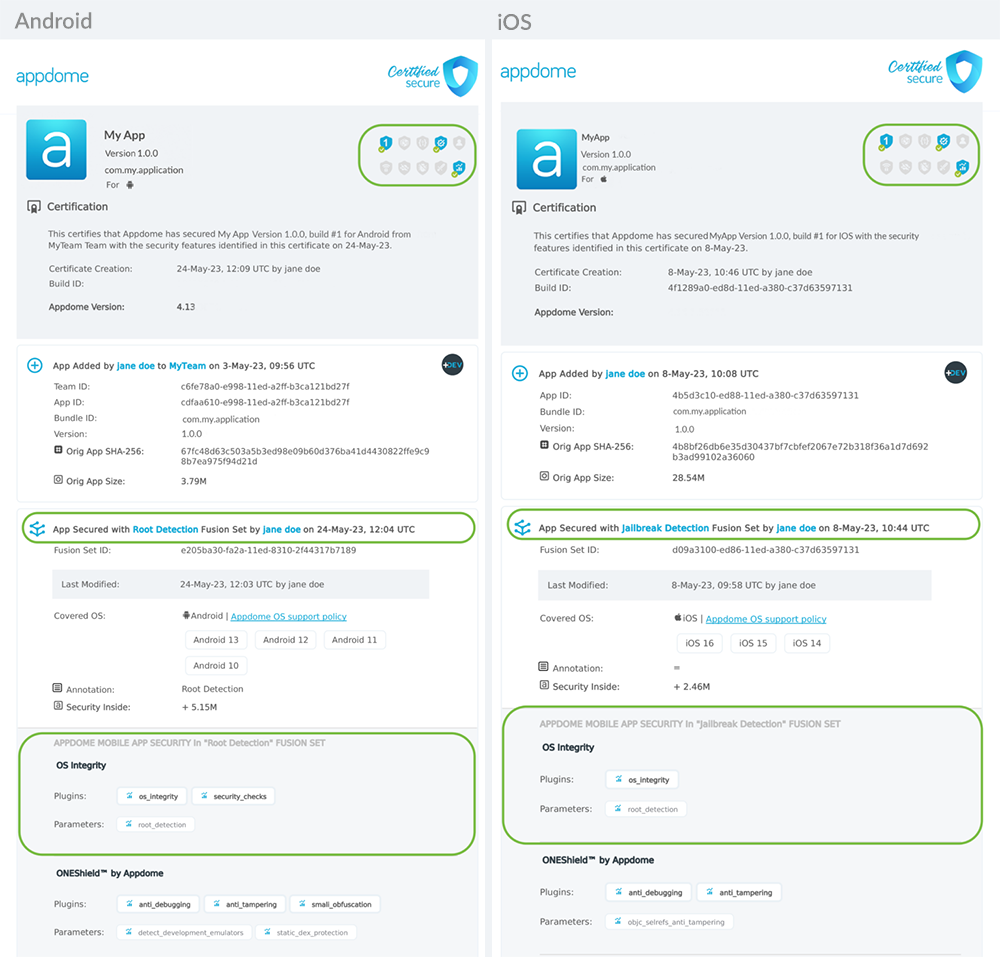
After you have implemented the required Threat-Event code in your React Native Apps, you can confirm that your Threat-Event implementation(s) is properly recognized by the Appdome protections in the React Native Apps. To do that, review the Certified Secure™ DevSecOps certificate for your build on Appdome.
In the Certified Secure DevSecOps certificate, a correct implementation of Threat Events in your mobile application looks like the one below.
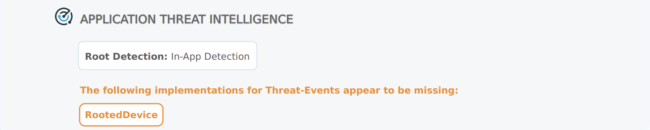
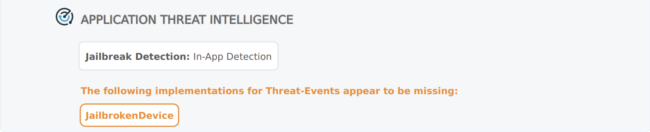
When Threat-Events implementation appears to be missing in your mobile application, the following indication will be shown in the Certified Secure DevSecOps certificate:
For information on how to view and/or retrieve the Certified Secure DevSecOps certification for your mobile application on Appdome, please visit the knowledge base article Using Certified Secure™ Android & iOS Apps Build Certification in DevOps CI/CD
If you have specific questions about implementing Threat-Events or Threat-Scores in React Native Apps, please send them our way at support.appdome.com or via the chat window on the Appdome platform.
Thanks for visiting Appdome! Our mission is to make mobile integration easy. We hope we’re living up to the mission with your project.
Want a Demo?
Threat-Events™ UX/UI Control