Implementing Threat-Memory™ in Android Apps
Overview
Threat-Memory™ allows Android applications to retrieve security detection data on demand. Using in-app API calls, the application can access the current threat state, including which threats have been detected, when they occurred, and their current status.
All data is returned as a JSONObject and can be queried at any point during runtime.
Beyond on-demand access to threat data, Threat-Memory™ keeps the application continuously informed as the threat posture evolves. Protected applications can track both threat-state changes and newly detected threats in real time, without the complexity of managing separate listeners for each event.
For a detailed explanation of what Threat-Memory™ is and how it fits into the threat intelligence management framework, see: Understanding Appdome Threat-Memory™
Prerequisites
- Configure each defense to use Threat-Memory™ mode within In-App Control on the Appdome platform.
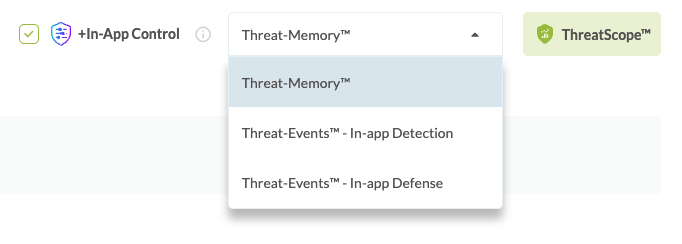
- When a defense is configured in Threat-Memory™ mode, any detected threats are stored locally on the device without any enforcement actions.
- Defenses configured with other intelligence modes (such as In-App Detection, In-App Defense, Failsafe, etc.) are not tracked by Threat-Memory™.
- The application must be built through the Appdome platform. Threat-Memory™ data is only available at runtime in a protected build.
Integration
Threat-Memory™ offers two ways to access threat-state information in your Android application:
- State getter APIs: Allow the application to retrieve the current or historical security state on demand, including session-level, installation-level, and threat-specific data.
- Threat-state callbacks: Threat-Memory™ callbacks that keep the application informed of threat activity. One callback notifies the application when the state of a Threat-Memory™-enabled threat changes, while the other notifies the application when a new threat is detected.
Together, these capabilities enable the application to respond to detections and threat-state changes in real time by querying the device risk level whenever additional context is needed.
Follow these steps to integrate and use Threat-Memory™ in your Android application.
Step 1: Create the Appdome Package
In your Android project, create a package named:
com.appdome
In Android Studio:
- Open the app module.
- Go to
src/main/javaorsrc/main/kotlin. - Right-click your source folder and select New > Package.
- Name the package:
com.appdome
This package will contain the Threat-Memory™ API and callback placeholder files.
Step 2: Add the Threat-Memory™ Callback Class File
Add the AppdomeThreatCallbacks file to the newly created com.appdome package.
The onThreatStateChange(threatName) callback is invoked when the state of a Threat-Memory™-enabled threat changes during the application session. The callback receives the name of the threat whose state changed.
The onThreatDetected(threatName) callback is invoked each time a threat is recorded for a Threat-Memory™-enabled defense during the application session. Unlike onThreatStateChange, which is triggered only when the threat risk state transitions (for example, from safe to compromised or from compromised to safe), onThreatDetected is triggered for every detection occurrence, including repeated detections of the same threat. The callback receives the name of the detected threat.
Update the onThreatStateChange(threatName) and onThreatDetected(threatName) implementations with the application’s business logic for handling threat-state changes and individual detection events. For example, the application may query the updated threat state, log detections for telemetry, trigger an immediate in-app response, or send threat data to the backend.
Java
package com.appdome;

import androidx.annotation.Keep;
import android.util.Log;
import org.json.JSONObject;

@Keep
public class AppdomeThreatCallbacks {

    @Keep
    public static void onThreatStateChange(String threatName) {
        // Handle threat state changes here.
        // Use the threatName to query updated state using AppdomeThreatApi.
        // JSONObject threatState = AppdomeThreatApi.getThreatSessionState(threatName);

        // Example: print the updated threat state to the log.
        // Log.d("ThreatMemory", "Threat state changed: " + threatName);
        // Log.d("ThreatMemory", "Updated threat state: " + threatState);
    }

    @Keep
    public static void onThreatDetected(String threatName) {
        // Called every time a new threat detection occurs for a ThreatMemory-enabled defense.
        // Use the threatName to query the updated threat state using AppdomeThreatApi.
        // JSONObject threatState = AppdomeThreatApi.getThreatSessionState(threatName);

        // Example: print the detected threat to the log.
        // Log.d("ThreatMemory", "Threat detected: " + threatName);
        // Log.d("ThreatMemory", "Updated threat state: " + threatState);
    }

}
Kotlin
package com.appdome

import androidx.annotation.Keep
import android.util.Log
import org.json.JSONObject

@Keep
object AppdomeThreatCallbacks {

    @Keep
    @JvmStatic
    fun onThreatStateChange(threatName: String) {
        // Handle threat state changes here.
        // Use the threatName to query updated state using AppdomeThreatApi.
        // val threatState: JSONObject = AppdomeThreatApi.getThreatSessionState(threatName)

        // Example: print the updated threat state to the log.
        // Log.d("ThreatMemory", "Threat state changed: $threatName")
        // Log.d("ThreatMemory", "Updated threat state: $threatState")
    }

    @Keep
    @JvmStatic
    fun onThreatDetected(threatName: String) {
        // Called every time a new threat detection occurs for a ThreatMemory-enabled defense.
        // Use the threatName to query the updated threat state using AppdomeThreatApi.
        // val threatState: JSONObject = AppdomeThreatApi.getThreatSessionState(threatName)

        // Example: print the detected threat to the log.
        // Log.d("ThreatMemory", "Threat detected: $threatName")
        // Log.d("ThreatMemory", "Updated threat state: $threatState")
    }

}
Step 3: Add the Threat-Memory™ API Placeholder Class
Add the AppdomeThreatApi class file to the com.appdome package.
The file below contains placeholder implementations for the Threat-Memory™ API methods.
The implementation in the placeholder class allows the unprotected application to be tested using developer-controlled responses prior to protecting the application with Appdome.
The AppdomeThreatApi methods are replaced in the protected application and return Threat-Memory™ responses at runtime.
Java
package com.appdome;

import androidx.annotation.Keep;
import org.json.JSONException;
import org.json.JSONObject;

@Keep
public class AppdomeThreatApi {

    private static JSONObject stubResponse(String description) {
        JSONObject obj = new JSONObject();
        try {
            obj.put("info", "Return stub response for - " + description);
        } catch (JSONException ignored) {
        }
        return obj;
    }

    @Keep
    public static JSONObject getThreatSessionState(String threatName) {
        return stubResponse("getThreatSessionState(" + threatName + ")");
    }

    @Keep
    public static JSONObject getThreatSessionState(String threatName, String sessionID) {
        return stubResponse("getThreatSessionState(" + threatName + ", " + sessionID + ")");
    }

    @Keep
    public static JSONObject getThreatInstallationState(String threatName) {
        return stubResponse("getThreatInstallationState(" + threatName + ")");
    }

    @Keep
    public static JSONObject getSessionState() {
        return stubResponse("getSessionState()");
    }

    @Keep
    public static JSONObject getSessionState(String sessionID) {
        return stubResponse("getSessionState(" + sessionID + ")");
    }

    @Keep
    public static JSONObject getInstallationState() {
        return stubResponse("getInstallationState()");
    }
}
Kotlin
package com.appdome

import androidx.annotation.Keep
import org.json.JSONObject

@Keep
object AppdomeThreatApi {

    private fun stubResponse(description: String): JSONObject {
        return JSONObject().apply {
            put("info", "Return stub response for - $description")
        }
    }

    @Keep
    @JvmStatic
    fun getThreatSessionState(threatName: String): JSONObject {
        return stubResponse("getThreatSessionState($threatName)")
    }

    @Keep
    @JvmStatic
    fun getThreatSessionState(threatName: String, sessionID: String): JSONObject {
        return stubResponse("getThreatSessionState($threatName, $sessionID)")
    }

    @Keep
    @JvmStatic
    fun getThreatInstallationState(threatName: String): JSONObject {
        return stubResponse("getThreatInstallationState($threatName)")
    }

    @Keep
    @JvmStatic
    fun getSessionState(): JSONObject {
        return stubResponse("getSessionState()")
    }

    @Keep
    @JvmStatic
    fun getSessionState(sessionID: String): JSONObject {
        return stubResponse("getSessionState($sessionID)")
    }

    @Keep
    @JvmStatic
    fun getInstallationState(): JSONObject {
        return stubResponse("getInstallationState()")
    }
}
Step 4: Call the Threat-Memory™ API
After adding the AppdomeThreatApi placeholder API file, the Threat-Memory™ getter APIs can be called from any Java or Kotlin file in the application.
Java
import com.appdome.AppdomeThreatApi;
import org.json.JSONObject;
import android.util.Log;

JSONObject sessionState = AppdomeThreatApi.getSessionState();
Log.d("ThreatMemory", "Session state: " + sessionState);
Kotlin
import com.appdome.AppdomeThreatApi
import org.json.JSONObject
import android.util.Log
val sessionState: JSONObject = AppdomeThreatApi.getSessionState()
Log.d("ThreatMemory", "Session state: $sessionState")
All methods are exposed as static methods on com.appdome.AppdomeThreatApi.
Each method returns a JSONObject.
Calls are synchronous, use on-device storage, and return immediately without waiting for network requests.
Step 5: Test and Validate the Integration
1. Build the App and Test Without Appdome
At this stage, Threat-Memory™ is not present in the application because the application has not yet been protected by Appdome.
All calls to AppdomeThreatApi return placeholder responses. These responses can be modified during development to invoke and validate different threat scenarios in the application. This simplifies testing of the unprotected version before protecting the application. For example, you can test an end-to-end flow that collects Threat-Memory™ data in the application and sends threat telemetry to the backend.
2. Protect the App with Appdome
Build the protected application on the Appdome platform with Threat-Memory™ enabled for the selected defenses in the defense policy.
Once the application is protected:
- The placeholder implementations are automatically replaced at runtime.
- All
AppdomeThreatApimethods return threat data collected on the device from defenses monitored by Threat-Memory™. - No code changes are required between testing and production builds.
- The integration does not require changes when the defense policy is updated, for example, when adding a new Threat-Memory™-enabled defense.
API Reference
Glossary
Session
A session represents a single app launch until it is closed by the user or the operating system (OS), identified by a sessionID.
Installation
An installation represents the lifetime of a given app version on the device across sessions, identified by an installationID.
Threat State
Threat State represents the current risk status of a specific threat or the overall security posture of an application session or installation.
Session State
Session State represents the security status of a single application process lifetime, from launch to termination. It is identified by a unique sessionID and includes an overall status of either safe (no active critical threats), compromised (at least one active threat), or evaluating (the defense has not completed the verification logic required to detect the threat).
Installation-Level Data
Installation-level data resets on application upgrades or reinstalls.
Class: AppdomeThreatApi
AppdomeThreatApi exposes class methods for querying Threat-Memory™ data at runtime.
All methods:
- Return a
JSONObject - Execute synchronously using on-device data
- Do not require delegates, callbacks, or network requests
Session-Level Methods
getSessionState()
Method Signature
Java
JSONObject getSessionState()
Kotlin
fun getSessionState(): JSONObject
Description
Returns the full Threat-Memory™ state for the current application session.
Parameters
None.
Returns
A JSONObject containing the full threat state for the current session. See the Returned Data section for the expected fields and example response.
Usage Examples
Java
import com.appdome.AppdomeThreatApi;
import org.json.JSONObject;
import android.util.Log;

JSONObject sessionState = AppdomeThreatApi.getSessionState();

// Print the entire object
Log.d("ThreatMemory", "Full session state: " + sessionState);

// Access a specific field
JSONObject threats = sessionState.optJSONObject("threats");
if (threats != null) {
    Log.d("ThreatMemory", "Threats: " + threats);
}
Kotlin
import com.appdome.AppdomeThreatApi
import org.json.JSONObject
import android.util.Log

val sessionState: JSONObject = AppdomeThreatApi.getSessionState()

// Print the entire object
Log.d("ThreatMemory", "Full session state: $sessionState")

// Access a specific field
val threats = sessionState.optJSONObject("threats")
if (threats != null) {
    Log.d("ThreatMemory", "Threats: $threats")
}
getSessionState(sessionID)
Method Signature
Java
JSONObject getSessionState(String sessionID)
Kotlin
fun getSessionState(sessionID: String): JSONObject
Description
Returns the full Threat-Memory™ state for a specific session.
Use this method with a session identifier returned from a previous Threat-Memory™ API call. The current session ID can be obtained from the sessionID field returned by getSessionState().
Calling getSessionState(currentSessionID) with the current sessionID is equivalent to calling getSessionState().
Parameters
|
Name |
Type |
Description |
|---|---|---|
sessionID |
String | The session identifier to query. You can obtain this value from the sessionID field returned by getSessionState(). |
Returns
A JSONObject containing the full threat state for the specified session. See Returned Data for the expected fields and example response.
Usage Example
Java
JSONObject sessionState = AppdomeThreatApi.getSessionState("");

Log.d("ThreatMemory", "Full session state: " + sessionState);

JSONObject threats = sessionState.optJSONObject("threats");
if (threats != null) {
    Log.d("ThreatMemory", "Threats: " + threats);
}
Kotlin
val sessionState = AppdomeThreatApi.getSessionState("")

Log.d("ThreatMemory", "Full session state: $sessionState")

val threats = sessionState.optJSONObject("threats")
if (threats != null) {
    Log.d("ThreatMemory", "Threats: $threats")
}
getThreatSessionState(threatName)
Method Signature
Java
JSONObject getThreatSessionState(String threatName)
Kotlin
fun getThreatSessionState(threatName: String): JSONObject
Description
Returns the Threat-Memory™ state for a single threat in the current session.
Use threatName to specify the Threat-Event identifier of the defense being queried. Refer to the Appdome Threat Knowledge Base to find the threat name associated with the specific protection you enabled.
Parameters
|
Name |
Type |
Description |
|---|---|---|
threatNAME |
string |
The identifier of the threat to query. Use the same value returned in the “threatName” field from ThreatMemory responses (for example, “ActiveVpnDetected”). |
Returns
A JSONObject containing the state of the specified threat for the current session. See Returned Data for the expected fields and example response.
Usage Example
Java
JSONObject threatState = AppdomeThreatApi.getThreatSessionState("ActiveVpnDetected");

Log.d("ThreatMemory", "Full threat state: " + threatState);

String state = threatState.optString("state", null);
if (state != null) {
    Log.d("ThreatMemory", "Threat state: " + state);
}
Kotlin
val threatState = AppdomeThreatApi.getThreatSessionState("ActiveVpnDetected")

Log.d("ThreatMemory", "Full threat state: $threatState")

val state = threatState.optString("state", null)
if (state != null) {
    Log.d("ThreatMemory", "Threat state: $state")
}
getThreatSessionState(threatName, sessionID)
Method Signature
Java
JSONObject getThreatSessionState(String threatName, String sessionID)Kotlin
fun getThreatSessionState(threatName: String, sessionID: String): JSONObjectDescription
Returns the Threat-Memory™ state for a single threat in the session identified by sessionID.
Use threatName to specify the identifier of the threat you want to query. This value should match the threatName field returned in Threat-Memory™ responses. Refer to the Appdome Threat Knowledge Base to find the correct threat name for the specific protection you enabled.
Use sessionID to specify the session to query. The sessionID field can be obtained from the getSessionState() response. Note that calling getThreatSessionState(threatName, currentSessionID) with the current sessionID is equivalent to calling getThreatSessionState(threatName).
Parameters
|
Name |
Type |
Description |
|---|---|---|
threatNAME |
string |
The threat identifier |
sessionID |
string |
The session identifier |
Returns
A JSONObject containing the state of the specified threat for the specified session. See Returned Data for the expected fields and example response.
Usage Example
Java
JSONObject threatState = AppdomeThreatApi.getThreatSessionState(
    "ActiveADBDetected",
    ""
);

Log.d("ThreatMemory", "Full threat state: " + threatState);

String state = threatState.optString("state", null);
if (state != null) {
    Log.d("ThreatMemory", "Threat state: " + state);
}
Kotlin
val threatState = AppdomeThreatApi.getThreatSessionState(
    "ActiveADBDetected",
    ""
)

Log.d("ThreatMemory", "Full threat state: $threatState")

val state = threatState.optString("state", null)
if (state != null) {
    Log.d("ThreatMemory", "Threat state: $state")
}
Installation-Level Methods
getInstallationState()
Method Signature
Java
JSONObject getInstallationState()
Kotlin
fun getInstallationState(): JSONObject
Description
Returns the full Threat-Memory™ state for the current app installation.
Parameters
None.
Returns
A JSONObject containing the aggregated threat state across all sessions in the current installation. See Returned Data for the expected fields and example response.
Usage Example
Java
import com.appdome.AppdomeThreatApi;
import org.json.JSONObject;
import android.util.Log;

JSONObject installationState = AppdomeThreatApi.getInstallationState();

// Print the entire object
Log.d("ThreatMemory", "Full installation state: " + installationState);

// Access a specific field
JSONObject threats = installationState.optJSONObject("threats");
if (threats != null) {
    Log.d("ThreatMemory", "Threats: " + threats);
}
Kotlin
import com.appdome.AppdomeThreatApi
import org.json.JSONObject
import android.util.Log

val installationState: JSONObject = AppdomeThreatApi.getInstallationState()

// Print the entire object
Log.d("ThreatMemory", "Full installation state: $installationState")

// Access a specific field
val threats = installationState.optJSONObject("threats")
if (threats != null) {
    Log.d("ThreatMemory", "Threats: $threats")
}
getThreatInstallationState(threatName)
Method Signature
Java
JSONObject getThreatInstallationState(String threatName)
Kotlin
fun getThreatInstallationState(threatName: String): JSONObject
Description
Returns the aggregated Threat-Memory™ state for a single threat across all sessions in the current installation.
Use threatName to specify the identifier of the threat you want to query. This value should match the threatName field returned in Threat-Memory™ responses. Refer to the Appdome Threat Knowledge Base to find the threat name for the specific protection you enabled.
Parameters
|
Name |
Type |
Description |
|---|---|---|
threatNAME |
string |
The threat identifier |
Returns
A JSONObject containing the installation-level state of the specified threat. See Returned Data for the expected fields and example response.
Usage Example
Java
import com.appdome.AppdomeThreatApi;
import org.json.JSONObject;
import android.util.Log;

JSONObject threatState = AppdomeThreatApi.getThreatInstallationState("ActiveADBDetected");

// Print the entire object
Log.d("ThreatMemory", "Full installation-level threat state: " + threatState);

// Access a specific field
String state = threatState.optString("state", null);
if (state != null) {
    Log.d("ThreatMemory", "Threat state: " + state);
}
Kotlin
import com.appdome.AppdomeThreatApi
import org.json.JSONObject
import android.util.Log

val threatState: JSONObject =
    AppdomeThreatApi.getThreatInstallationState("ActiveADBDetected")

// Print the entire object
Log.d("ThreatMemory", "Full installation-level threat state: $threatState")

// Access a specific field
val state = threatState.optString("state", null)
if (state != null) {
    Log.d("ThreatMemory", "Threat state: $state")
}
Returned Data
All Threat-Memory™ API methods return a JSONObject containing Threat-Memory™ data.
Note
All timestamp fields are formatted as: YYYY-MM-DD HH:MM:SS.mmm
Example: 2026-04-12 14:32:07.412
Session State Response
Returned by:
getSessionState()
getSessionState(String sessionID)
|
Field |
Type |
Description |
Expected Values |
|---|---|---|---|
|
|
String |
Unique identifier for the session |
UUID string |
|
|
JSONObject |
Mapping of threat names to their threat state objects |
Object of threat state objects |
|
|
JSONObject |
Device information collected at runtime, such as OS version, device model, and manufacturer. |
Object of string key-value pairs |
|
|
Number |
Total number of defenses tracked by ThreatMemory |
Integer ≥ 0 |
|
|
Number |
Total number of detected threats, where each distinct threat is counted once. |
Integer ≥ 0 |
|
|
String |
Overall security state of the session |
|
|
|
String |
Unique protected app identifier |
Build token string |
Device Metadata Object
Returned inside session and installation responses under the deviceMetadata key.
Every field is a JSON array of strings. In a session response, each array contains exactly one value (the value at session start). In an installation response, hardware-constant fields still contain one value, while environment fields that can change between sessions (for example, after an OS update) contain all distinct values observed across sessions, ordered from most recent to oldest.
|
Field |
Type |
Description |
Expected Values |
|---|---|---|---|
|
deviceManufacturer |
|
Device hardware manufacturer |
JSON array of strings |
|
deviceModel |
|
Device model identifier |
JSON array of strings |
|
deviceBrand |
|
Device brand name |
JSON array of strings |
|
deviceBoard |
|
Device board name |
JSON array of strings |
|
osVersion |
|
Android OS version |
JSON array of strings |
|
kernelInfo |
|
Linux kernel version |
JSON array of strings |
|
sdkVersion |
|
Android SDK version |
JSON array of strings |
|
buildNumber |
|
OS build number |
JSON array of strings |
|
basebandVersion |
|
Baseband/radio firmware version |
JSON array of strings |
|
buildUser |
|
OS build user identifier |
JSON array of strings |
|
buildHost |
|
OS build host identifier |
JSON array of strings |
Threat State Object
Represents the state of a single threat.
Returned by:
The threats object in the Session State Response
getThreatSessionState(...)
getThreatInstallationState(...)
|
Field |
Type |
Description |
Expected Values |
|---|---|---|---|
|
|
String |
Unique threat identifier |
Example: |
|
|
String |
Defines whether the threat persists or returns to a safe state. |
|
|
|
String |
Unique protected app identifier |
Build token string |
|
|
String |
Threat lifecycle state |
|
|
|
String |
Current threat risk state.
|
|
|
|
Number |
Number of recorded threat occurrences |
Integer ≥ 0 |
|
|
String |
Last time the threat state changed. Empty string indicates that the threat was not detected. |
Timestamp or Empty string |
|
|
String |
Time of first detection. Empty string indicates that the threat was not detected. |
Timestamp or Empty string |
|
|
String |
Time of most recent detection. Empty string indicates that the threat was not detected. |
Timestamp or Empty string |
|
|
JSONArray |
Array of detection records for this threat. Empty array when the threat is not detected. |
See Detection Data Object. |
|
|
JSONObject |
Flat snapshot of the most recent detection, combining detection identifiers with device and environment metadata. Returned only when the app is built with the Last-Detection Metadata option enabled. |
See Last Detection Data Object. |
Detection Data Object
Represents detailed information about a specific detection event.
|
Field |
Type |
Description |
Expected Values |
|---|---|---|---|
|
|
String |
Code representing the detection type |
String |
|
|
String |
Appdome-specific threat identifier |
String |
|
|
String |
Description of the detection |
String – Free text |
|
|
Integer |
Count how many this specific detection has been detected |
Integer >=0 |
|
|
String |
Reference code to provide to the Appdome Support agent for remediation or inquiries about this detection. |
String |
|
|
JSONObject |
Additional detection data, which may include more metadata regarding the detection. |
|
Detection data params may include additional fields depending on the specific threat and detection context.
Last Detection Data Object
Returned inside a Threat State Object under the lastDetectionData key when the app is built with the Last-Detection Metadata option enabled. Unlike the Device Metadata Object, each field contains a plain string rather than a JSON array.
| Field | Type | Description |
|---|---|---|
externalID |
String | Threat identifier, matching threatName. |
reasonCode |
String | Code representing the detection type. |
threatCode |
String | Appdome-specific threat identifier for this build. |
reasonData |
String | Description of the detection. |
reasonData0…N |
String | Additional per-probe detection detail. Present only for threats that report multiple probes. The number of entries varies by detection. |
message |
String | Detection message text as configured in the Fusion Set, with {app_display_name} resolved. |
timestamp |
String | Unix epoch seconds of the detection. |
fusedAppToken |
String | Protected app token. |
deviceManufacturer |
String | Device hardware manufacturer. |
deviceModel |
String | Device model identifier. |
deviceBrand |
String | Device brand name. |
deviceBoard |
String | Device board name. |
deviceID |
String | Device identifier, or no data when unavailable. |
UUID |
String | Device UUID. |
osVersion |
String | Android OS version. |
sdkVersion |
String | Android SDK version. |
buildNumber |
String | OS build number. |
basebandVersion |
String | Baseband/radio firmware version. |
kernelInfo |
String | Linux kernel version. |
buildUser |
String | OS build user identifier. |
buildHost |
String | OS build host identifier. |
carrierPlmn |
String | Carrier PLMN, or no data when unavailable. |
trueLatitude |
String | Device latitude, or N/A when unavailable. |
trueLongitude |
String | Device longitude, or N/A when unavailable. |
DetectionData Example
When a threat is detected:
[
  {
    "reasonCode": "9999",
    "threatCode": "AAAAA",
    "reasonData": "X was detected by Y...",
    "occurrenceCount": 1,
    "detectionReference": "9999:1234:AAAAA",
    "params": {...}
   }
],
"lastDetectionData": {
When a threat is not detected:
[]
Installation State Response
Returned by:
getInstallationState()
|
Field |
Type |
Description |
Expected Values |
|---|---|---|---|
|
|
String |
Unique identifier for the app installation |
UUID string |
|
|
Number |
Total number of threats registered as ThreatMemory features |
Integer ≥ 0 |
|
|
Number |
Total number of detected threats, where each distinct threat is counted once. |
Integer ≥ 0 |
|
|
String |
Aggregated threat state across all sessions |
|
|
|
JSONArray |
List of session IDs for this installation, ordered from most recent to oldest. |
Array of session IDs |
|
|
JSONObject |
Device attributes and environment metadata. Each field is an array. Hardware-constant fields contain a single value. Environment fields that can change between sessions contain all distinct values observed across sessions, ordered from most recent to oldest. |
See Device Metadata Object. |
|
|
JSONObject |
Mapping of threat names to aggregated threat state objects |
Object of threat state objects |
Example Output
getSessionState() and getSessionState(sessionID)
{
  "sessionID": "",
  "buildID": "",
  "sessionState": "compromised",
  "registeredThreatCount": 2,
  "detectedThreatCount": 1,
  "deviceMetadata": {
    "deviceManufacturer": ["Samsung"],
    "deviceModel": ["SM-G991B"],
    "deviceBrand": ["samsung"],
    "deviceBoard": ["exynos2100"],
    "osVersion": ["14"],
    "kernelInfo": ["..."],
    "sdkVersion": ["34"],
    "buildNumber": ["..."],
    "basebandVersion": ["..."],
    "buildUser": ["..."],
    "buildHost": ["..."]
  },
  "threats": {
    "ActiveADBDetected": {
      "threatName": "ActiveADBDetected",
      "transitionType": "persistentThreat",
      "buildID": "",
      "threatState": "active",
      "state": "compromised",
      "detectionCount": 1,
      "lastStateChangeTime": "2026-04-12 14:32:05.100",
      "firstDetectionTimestamp": "2026-04-12 14:32:01.230",
      "lastDetectionTimestamp": "2026-04-12 14:32:05.100",
      "detectionData": [
        {
          "reasonCode": "9999",
          "threatCode": "AAAAA",
          "reasonData": "...info..",
          "occurrenceCount": 1,
          "detectionReference": "9999:1234:AAAAA",
          "params": {...}
        }
      ],
      "lastDetectionData": {
        "externalID": "ActiveADBDetected",
        "reasonCode": "9999",
        "threatCode": "AAAAA",
        "timestamp": "...",
        "reasonData": "...info..",
        "deviceID": "...",
        "deviceManufacturer": "Samsung",
        "deviceModel": "SM-G991B",
        "deviceBrand": "samsung",
        "deviceBoard": "exynos2100",
        "osVersion": "14",
        "sdkVersion": "34",
        "kernelInfo": "...",
        "buildNumber": "...",
        "basebandVersion": "...",
        "buildUser": "...",
        "buildHost": "...",
        "trueLatitude": "N/A",
        "trueLongitude": "N/A",
        "carrierPlmn": "no data",
        "fusedAppToken": "...",
        "UUID": "..."
    },
    "FridaDetected": {
      "threatName": "FridaDetected",
      "transitionType": "resolvable",
      "threatState": "notDetected",
      "state": "safe",
      "detectionCount": 0,
      "lastStateChangeTime": "",
      "firstDetectionTimestamp": "",
      "lastDetectionTimestamp": "",
      "detectionData": []
    }
  }
}
getThreatSessionState(threatName)and getThreatSessionState(threatName, sessionId)
Returns the state of a single threat within the current session.
{
  "threatName": "RootedDevice",
  "transitionType": "persistentThreat",
  "buildID": "",
  "threatState": "active",
  "state": "compromised",
  "detectionCount": 2,
  "lastStateChangeTime": "2026-04-12 14:32:05.100",
  "firstDetectionTimestamp": "2026-04-12 14:32:01.230",
  "lastDetectionTimestamp": "2026-04-12 14:32:05.100",
  "detectionData": [
    {
      "reasonCode": "AAAA",
      "threatCode": "5ABCDE",
      "reasonData": "...info..",
      "occurrenceCount": 1,
      "detectionReference": "AAAA:1234:5ABCDE",
      "params": {...}
    }
  ],
 "lastDetectionData": {
    "externalID": "RootedDevice",
    "reasonCode": "AAAA",
    "threatCode": "5ABCDE",
    "timestamp": "...",
    "reasonData": "...info..",
    "deviceID": "...",
    "deviceManufacturer": "...",
    "deviceModel": "...",
    "deviceBrand": "...",
    "deviceBoard": "...",
    "osVersion": "...",
    "sdkVersion": "...",
    "kernelInfo": "...",
    "buildNumber": "...",
    "basebandVersion": "...",
    "buildUser": "...",
    "buildHost": "...",
    "trueLatitude": "N/A",
    "trueLongitude": "N/A",
    "carrierPlmn": "no data",
    "fusedAppToken": "...",
    "UUID": "..."
}
getInstallationState()
Returns the aggregated threat state across all sessions for the current app installation.
{
  "installationID": "",
  "registeredThreatCount": 3,
  "detectedThreatCount": 2,
  "installationState": "compromised",
  "sessionList": [
    "",
    ""
  ],
  "deviceMetadata": {
    "deviceManufacturer": ["Samsung"],
    "deviceModel": ["..."],
    "deviceBrand": ["..."],
    "deviceBoard": ["..."],
    "osVersion": ["14", "13"],
    "kernelInfo": ["..A..", "..B."],
    "sdkVersion": ["34", "33"],
    "buildNumber": ["UP1A.231005.007", "TP1A.220624.014"],
    "basebandVersion": ["G991BXXS9FXA1", "G991BXXS8EWL1"],
    "buildUser": ["..."],
    "buildHost": ["..."]
  },
  "threats": {
    "RootedDevice": {
      "threatName": "RootedDevice",
      "transitionType": "persistentThreat",
      "buildID": "",
      "threatState": "active",
      "state": "compromised",
      "detectionCount": 5,
      "lastStateChangeTime": "2026-04-12 14:32:05.100",
      "firstDetectionTimestamp": "2026-04-10 09:15:22.800",
      "lastDetectionTimestamp": "2026-04-12 14:32:05.100",
      "detectionData": [
        {
          "reasonCode": "AAAA",
          "threatCode": "5ABCDE",
          "reasonData": "...info...",
          "occurrenceCount": 5,
          "detectionReference": "AAAA:1234:5ABCDE",
          "params": {...}
        }
      ],
      "detectedSessions": {
        "": 2,
        "": 3
      }
    },
    "FridaDetected": {
      "threatName": "FridaDetected",
      "transitionType": "resolvable",
      "buildID": "",
      "threatState": "notDetected",
      "state": "safe",
      "detectionCount": 0,
      "lastStateChangeTime": "",
      "firstDetectionTimestamp": "",
      "lastDetectionTimestamp": "",
      "detectionData": []
    },
    "AppIsDebuggable": {
      "threatName": "AppIsDebuggable",
      "transitionType": "resolvable",
      "buildID": "",
      "threatState": "detectedInPreviousSession",
      "state": "safe",
      "detectionCount": 1,
      "lastStateChangeTime": "2026-04-10 09:16:10.300",
      "firstDetectionTimestamp": "2026-04-10 09:16:10.300",
      "lastDetectionTimestamp": "2026-04-10 09:16:10.300",
      "detectionData": [
        {
          "reasonCode": "BBBB",
          "threatCode": "1ABCDE",
          "reasonData": "...info..",
          "occurrenceCount": 1,
          "detectionReference": "BBBB:1234:1ABCDE",
          "params": {....}
        }
      ], "lastDetectionData": {
            "externalID": "...",
            "reasonCode": "BBBB",
            "threatCode": "1ABCDE",
            "timestamp": "...",
            "reasonData": "...info..",
            "deviceID": "...",
            "deviceManufacturer": "Samsung",
            "deviceModel": "...",
            "deviceBrand": "...",
            "deviceBoard": "...",
            "osVersion": "...",
            "sdkVersion": "...",
            "kernelInfo": "...",
            "buildNumber": "...",
            "basebandVersion": "...",
            "buildUser": "...",
            "buildHost": "...",
            "trueLatitude": "N/A",
            "trueLongitude": "N/A",
            "carrierPlmn": "no data",
            "fusedAppToken": "...",
            "UUID": "..."

},
      "detectedSessions": {
        "": 1
      }
    }
  }
}
getThreatInstallationState(threatName)
Returns the aggregated state of a single threat across all sessions.
{
  "threatName": "RootedDevice",
  "transitionType": "persistentThreat",
  "buildID": "",
  "threatState": "active",
  "state": "compromised",
  "detectionCount": 5,
  "lastStateChangeTime": "2026-04-12 14:32:05.100",
  "firstDetectionTimestamp": "2026-04-10 09:15:22.800",
  "lastDetectionTimestamp": "2026-04-12 14:32:05.100",
  "detectionData": [
    {
      "reasonCode": "AAAA",
      "threatCode": "BBBBBB",
      "reasonData": "...",
      "occurrenceCount": 5,
      "params": {...}
    }
  ], "lastDetectionData": {
       "externalID": "RootedDevice",
       "reasonCode": "AAAA",
       "threatCode": "BBBBBB",
       "timestamp": "...",
       "reasonData": "...",
       "deviceID": "...",
       "deviceManufacturer": "...",
       "deviceModel": "...",
       "deviceBrand": "...",
       "deviceBoard": "...",
       "osVersion": "...",
       "sdkVersion": "...",
       "kernelInfo": "...",
       "buildNumber": "...",
       "basebandVersion": "...",
       "buildUser": "...",
       "buildHost": "...",
       "trueLatitude": "N/A",
       "trueLongitude": "N/A",
       "carrierPlmn": "no data",
       "fusedAppToken": "...",
       "UUID": "..."
},
  "detectedSessions": {
    "": 2,
    "": 3
  }
}
Retention Policy
Threat-Memory™ stores threat detection data locally on the device to enable both real-time and historical analysis.
Session data remains available during app runtime and is cleared when the app closes.
Historical data (cross-session threat data) is preserved in persistent storage on the device.
Installation-level data is reset when the app is updated or reinstalled.
Threat-Memory™ retains threat data using a rolling history of sessions and detections, discarding older entries as new data arrives once the number of sessions containing threat data exceeds the configured window size. Both the rolling session window size and the volume of unique threat data retained are governed by the retention policy defined in the defense policy.
How to Interpret the Response
Threat-Memory™ responses provide an overall risk state as well as detailed per-threat information.
Overall State vs. Per-Threat State
sessionState / installationState
Represents the overall risk status of the session or installation.
|
Value |
Meaning |
|---|---|
|
|
No active threats detected |
|
|
There are no active threats, but at least one threat has not yet completed its initial evaluation. |
|
|
At least one threat is currently active |
state per threat
Indicates whether a specific threat is currently active.
|
Value |
Meaning |
|---|---|
|
|
The defense hasn’t not yet completed the initial threat evaluation. |
|
|
No threat is currently impacting the app |
|
|
Active threat is actively impacting the app |
Threat Lifecycle: threatState
The threatState field describes the lifecycle state of a threat.
|
Value |
Meaning |
|---|---|
|
|
Threat is currently active and affecting the app |
|
|
Threat was detected earlier in the current session, but is not currently active |
|
|
Threat was detected in a previous session |
|
|
Threat has never been detected |
|
|
The defense has not completed the initial threat evaluation. |
Persistent vs. Resolvable Threats
The transitionType field indicates how a threat behaves over time.
|
Value |
Meaning |
|---|---|
|
|
The threat is considered active once detected, such as a rooted or jailbroken device |
|
|
The threat can be resolved and return to a safe state, such as vpn or proxy |
Detection Count and History
These fields provide insight into threat frequency and timing base on the scope of the query – session vs installation.
|
Value |
Meaning |
|---|---|
|
|
Total number of threat detection occurrences |
|
|
First time the threat was detected |
|
|
Most recent detection |
|
|
Last time the threat state changed |
Detection Data
The detectionData field provides additional context about a detected threat.
When a threat is detected, detectionData is an array of objects with these fields:
reasonCode
threatCode
reasonData
occurrenceCount
detectionReference
params
When a threat is not detected, detectionData is an empty array.
Session and Installation Scope
A session represents a single app launch.
An installation aggregates threat data across multiple sessions for the current app installation.
Installation-level data:
- Is tied to the current app installation.
- Does not persist between app reinstalls.
Use installation-level data to evaluate long-term risk patterns, such as fraud or staged attacks carried out across multiple sessions.
Example Interpretation
The following examples show how to check whether the current session is compromised and identify which threats are active.
Java
import android.util.Log;
import org.json.JSONObject;
import java.util.Iterator;

JSONObject sessionState = AppdomeThreatApi.getSessionState();

String overallState = sessionState.optString("sessionState", "");

if ("compromised".equals(overallState)) {
    Log.d("ThreatMemory", "The session is compromised");

    JSONObject threats = sessionState.optJSONObject("threats");
    if (threats != null) {
        Iterator threatNames = threats.keys();

        while (threatNames.hasNext()) {
            String threatName = threatNames.next();
            JSONObject threat = threats.optJSONObject(threatName);

            if (threat != null && "compromised".equals(threat.optString("state", ""))) {
                Log.d("ThreatMemory", "Active threat: " + threatName);
            }
        }
    }
}
Kotlin
import android.util.Log
import org.json.JSONObject

val sessionState: JSONObject = AppdomeThreatApi.getSessionState()

val overallState = sessionState.optString("sessionState", "")

if (overallState == "compromised") {
    Log.d("ThreatMemory", "The session is compromised")

    val threats = sessionState.optJSONObject("threats")
    if (threats != null) {
        val threatNames = threats.keys()

        while (threatNames.hasNext()) {
            val threatName = threatNames.next()
            val threat = threats.optJSONObject(threatName)

            if (threat?.optString("state", "") == "compromised") {
                Log.d("ThreatMemory", "Active threat: $threatName")
            }
        }
    }
}
This example:
-
Checks whether the session is compromised.
-
Iterates over all threats in the
threatsobject. -
Identifies which threats are currently active.
Related Articles
- Implementing Threat-Memory™ in iOS Apps
- Understanding Appdome Threat-Memory™
- Understanding Appdome +In-App Control
How Do I Learn More?
If you have any questions, please send them our way at support.appdome.com or via the chat window on the Appdome platform.
Thank you!
Thanks for visiting Appdome! Our mission is to secure every app on the planet by making mobile app security easy. We hope we’re living up to the mission with your project.