
How to Implement MobileBOT™ Defense Using AI
What is Appdome MobileBOT™ Defense?
The new MobileBOT™ Defense solution offers mobile brands unparalleled bot detection, comprehensive intelligence, and rapid defense against malicious bots, credential stuffing, and ATOs in mobile app business lines. Appdome’s MobileBOT™ combines several defense methods to address these weaknesses and provide a robust solution for securing mobile apps against malicious bots. MobileBOT™ offers full support for all mobile languages and frameworks, including Obj-C, Java, JS, C#, C++, Swift, Kotlin, Flutter, React Native, Unity, Maui, Xamarin, Cordova, and more. Integration with your mobile apps is facilitated through a No-Code, No-SDK, and Fully Automated Delivery built to integrate seamlessly with mobile DevOps pipelines. MobileBOT™ Defense is configured through the MobileBOT™ Defense workspace in Appdome AI, where security capabilities are organized into dedicated configuration sections.
Prerequisites for using Appdome’s MobileBOT™ Defense:
To use Appdome’s mobile app security build system for Mobile Bot Defense, you’ll need:
- Appdome account (create a free Appdome account here)
- A license for MobileBOT™
- Mobile App (.ipa for iOS device or .apk or .aab for Android)
- Signing Credentials (see Signing Secure Android apps and Signing Secure iOS apps)
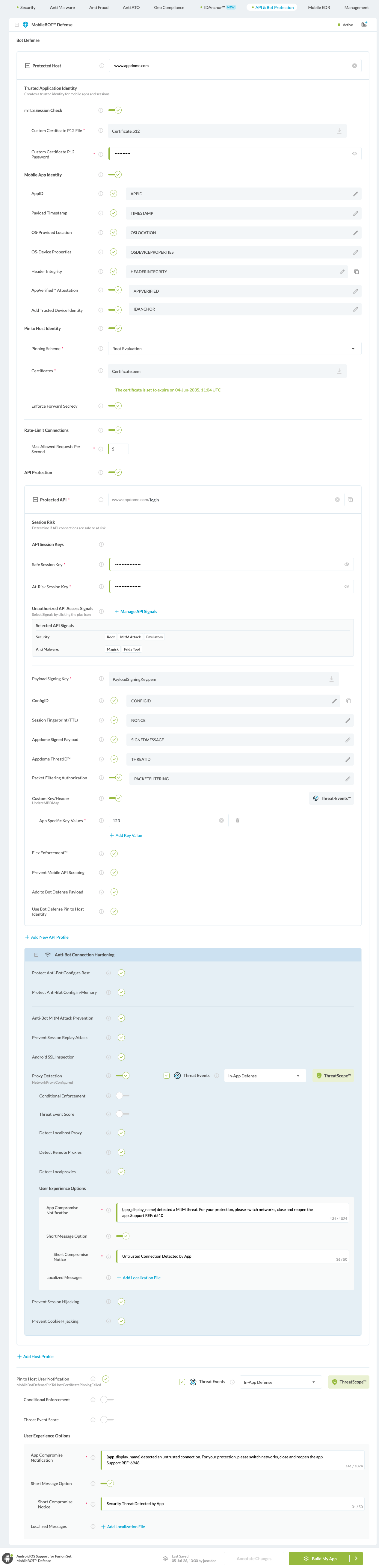
After enabling MobileBOT™ Defense, configure the available security capabilities according to your application’s security requirements. The MobileBOT™ Defense workspace is organized into the following configuration sections:
MobileBOT™ Defense Configuration Overview
Protected Host
The Protected Host defines the backend host or API endpoint that MobileBOT™ Defense protects. Each Protected Host can be configured independently with its own MobileBOT™ Defense security policies and protection settings.
Trusted Application Identity
Trusted Application Identity establishes a trusted identity for the protected mobile application, allowing backend services to verify that requests originate from an Appdome-protected application.
mTLS Session Check
mTLS Session Check enables mutual TLS authentication by validating a client certificate during the TLS handshake, providing an additional layer of trust before the MobileBOT™ Defense payload is evaluated.
For detailed configuration instructions, see: How to Enforce mTLS Session Check in MobileBOT™ Defense
Mobile App Identity
Mobile App Identity adds trusted application identity attributes to protected requests, enabling backend services to validate application authenticity and verify protected sessions.
Pin to Host Identity
Pin to Host Identity validates the server identity presented by the protected host, helping prevent unauthorized endpoints and man-in-the-middle attacks.
For detailed configuration instructions, see: How to Secure Android & iOS Apps with Pin to Host Identity
Enforce Forward Secrecy
Enforce Forward Secrecy requires TLS connections to use Perfect Forward Secrecy (PFS) handshake algorithms when communicating with trusted hosts. This ensures that each TLS session uses a unique encryption key, reducing the risk that previously captured encrypted traffic could be decrypted if a server’s long-term private key is compromised. For detailed configuration instructions, see: How to Protect Mobile Apps with Enforce Forward Secrecy Using AI
Rate-Limit Connections
Rate-Limit Connections limits the number of requests a protected application can send to a protected host during a defined time interval, helping reduce abuse and automated attacks.
For detailed configuration instructions, see: How to Enforce Rate-Limit Connections in MobileBOT™ Defense
API Protection
API Protection secures communication between mobile applications and backend APIs by combining Session Risk, API Session Keys, Unauthorized API Access Signals, payload signing, payload validation, custom headers, and additional API security capabilities.
For detailed configuration instructions, see: How to Use API Protection in MobileBOT™ Defense Using AI
API Protection includes the following capabilities:
Protected API
Protected API defines the backend API endpoint that Appdome protects. Each Protected API inherits the MobileBOT™ Defense configuration of its Protected Host while allowing API-specific protection settings.
Session Risk
Session Risk determines whether API requests are classified as Safe or At-Risk based on the configured Unauthorized API Access Signals and the security posture of the protected mobile application.
API Session Keys
API Session Keys define separate authentication keys for Safe and At-Risk sessions, allowing backend services to distinguish between trusted and potentially compromised API requests.
The Safe Session Key is used for requests classified as safe, while the At-Risk Session Key is used when the session is determined to be at risk. For detailed configuration instructions, see: How to Use API Session Keys in MobileBOT™ Defense Using AI
Unauthorized API Access Signals
Unauthorized API Access Signals allow developers to select which device and application security signals contribute to Session Risk classification.
Selected signals—such as Root, Magisk, Frida, Emulators, Jailbreak, Fake Location, and other supported detections—are evaluated by Session Risk to classify protected API requests as Safe or At-Risk. For detailed configuration instructions, see: How to Use Unauthorized API Access Signals with MobileBOT™ Defense Using AI
Payload Signing Key
Payload Signing Key specifies the public key used to validate the integrity and authenticity of the MobileBOT™ Defense payload before it is processed by backend services.
ConfigID
ConfigID identifies the MobileBOT™ Defense configuration used to generate the protected payload, allowing backend services to validate that requests were created using the expected security configuration.
Session Fingerprint (TTL)
Session Fingerprint (TTL) defines the lifetime of the generated session fingerprint used to uniquely identify protected mobile sessions over time.
Appdome Signed Payload
Appdome Signed Payload digitally signs the MobileBOT™ Defense payload, allowing backend services to verify its authenticity and integrity before processing incoming requests.
Appdome ThreatID™
Appdome ThreatID™ uniquely identifies the security events detected during a protected session, enabling backend services to correlate requests with detected MobileBOT™ Defense threats. For detailed configuration instructions, see: How to Use Appdome ThreatID™ in MobileBOT™ Defense Using AI
Packet Filtering Authorization
Packet Filtering Authorization adds an authorization value to the MobileBOT™ Defense payload, allowing backend services to validate approved network traffic before processing protected requests.
Custom Key/Header
Custom Key/Header allows developers to add application-specific key/value pairs to the MobileBOT™ Defense payload for use by backend services and API gateways. For detailed configuration instructions, see: How to Use Custom Key/Header with MobileBOT™ Defense
Flex Enforcement™
Flex Enforcement enables flexible API Protection policy enforcement, allowing protection behavior to be customized for specific application and backend requirements.
Prevent Mobile API Scraping
Prevent Mobile API Scraping detects and helps prevent automated API scraping attempts originating from protected mobile applications.
Add to Bot Defense Payload
Add to Bot Defense Payload includes the selected API Protection information in the MobileBOT™ Defense payload sent to backend services for validation and policy enforcement.
Use Bot Defense Pin to Host Identity
Use Bot Defense Pin to Host Identity extends Pin to Host Identity validation to the MobileBOT™ Defense payload, allowing backend services to verify that requests originate from trusted hosts protected by Appdome.
Anti-Bot Connection Hardening
Anti-Bot Connection Hardening strengthens the communication channel between the protected mobile application and backend services by protecting MobileBOT™ Defense configuration data, preventing replay attacks, detecting interception attempts, and securing trusted communication throughout the session lifecycle.
Anti-Bot Connection Hardening includes the following protection options:
Protect Anti-Bot Config at-Rest
Encrypts all MobileBOT™ Defense configuration data, including hosts, certificates, keys, and other security artifacts while stored within the protected application, helping prevent unauthorized extraction or harvesting.
Protect Anti-Bot Config in-Memory
Protects MobileBOT™ Defense configuration data while it is loaded into application memory, helping prevent attackers from extracting sensitive configuration information during runtime.
Anti-Bot MitM Attack Prevention
Validates the authenticity of communication sessions by performing server certificate pinning and certificate chain validation. This helps ensure that connections are established only with trusted servers, protecting against Man-in-the-Middle (MitM) attacks and unauthorized interception of application traffic.
Prevent Session Replay Attack
Detects and prevents session replay attacks by ensuring previously captured session information cannot be reused to establish unauthorized connections.
Android SSL Inspection
Detects and prevents Man-in-the-Middle (MitM) attacks performed through SSL inspection proxies or other intermediary devices by blocking connections to unknown, untrusted, or malicious proxies attempting to inspect protected traffic.
Prevent Session Hijacking
Detects and prevents session hijacking by validating the authenticity of protected communication sessions before allowing application traffic to proceed.
Prevent Cookie Hijacking
Helps protect authenticated application sessions by preventing unauthorized reuse, theft, or manipulation of session cookies during communication with backend services.
Certify the MobileBOT™ Defense features in Android & iOS Apps.
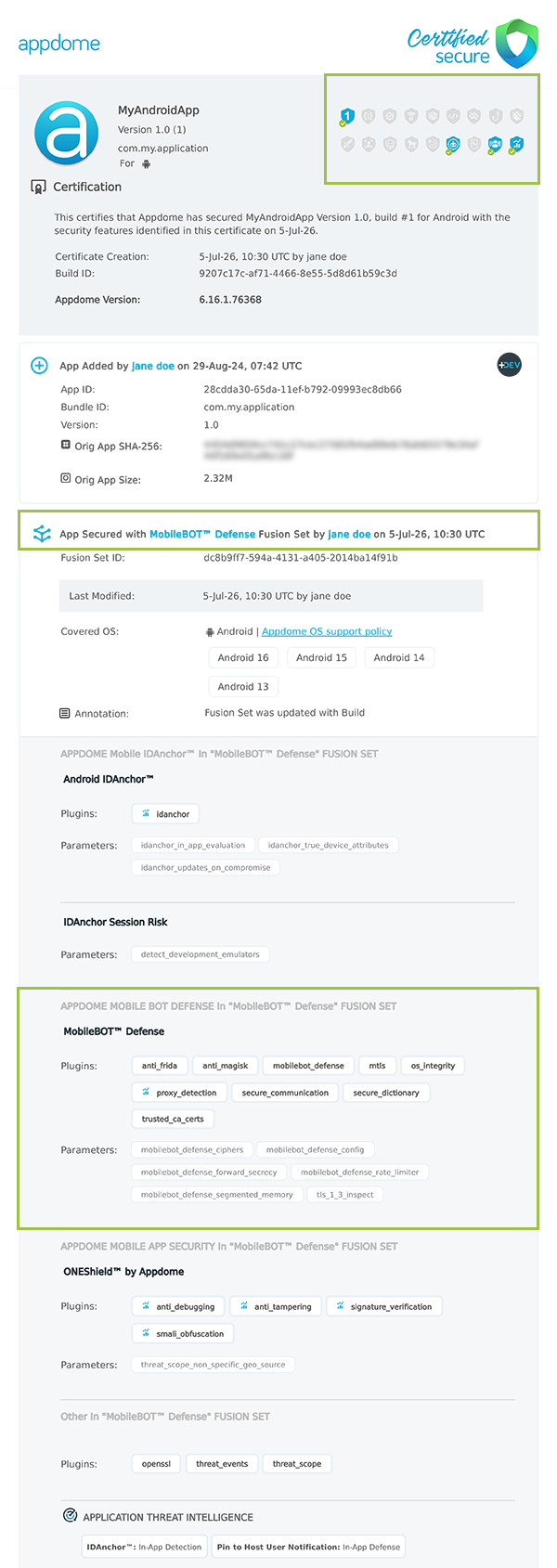
After building MobileBOT™ Defense features, Appdome generates a Certified Secure™ certificate to guarantee that the MobileBOT™ Defense protection has been added and is protecting the app. To verify that the MobileBOT™ Defense protection has been added to the mobile app, locate the protection in the Certified Secure™ certificate as shown below:
Related Articles:
- How to use Custom Key/Header with Mobile Bot Defense
- How to Use API Protection in Mobile Bot Defense Using AI
- How to Use API Session Keys in Mobile Bot Defense Using AI
How Do I Learn More?
If you have any questions, please send them our way at support.appdome.com or via the chat window on the Appdome platform.
Thank you!
Thanks for visiting Appdome! Our mission is to secure every app on the planet by making mobile app security easy. We hope we’re living up to the mission with your project. If you don’t already have an account, you can sign up for free.