Understanding Appdome +In-App Control
In-App Control
In this section of the Appdome Knowledge Base, learn how to use Appdome’s In-App Control for Android and iOS apps. In-App Control is Appdome’s framework for delivering threat intelligence directly into the mobile application at runtime, giving developers, anti-fraud, identity, and business teams full control over how the app detects, evaluates, and responds to cyber and fraud threats.
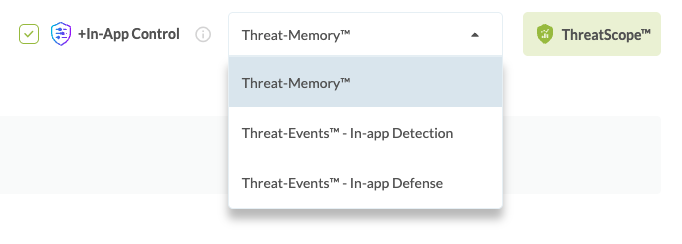
In-App Control offers three modes: Threat-Memory™, Threat-Events™ – In-App Detection, and Threat-Events™ – In-App Defense. Each mode provides a different level of intelligence, control, and enforcement—from stateful, on-device threat profiling to event-driven notification with optional built-in defense.
In-App Control Modes
Threat-Memory™
Threat-Memory™ is Appdome’s most advanced In-App Control mode. It provides stateful, on-device threat intelligence that accumulates across sessions, giving the application a complete, queryable threat profile of the device at any point during runtime.
Unlike event-driven approaches that deliver isolated, moment-in-time signals, Threat-Memory™ maintains a structured record of every detected threat, including its current state, detection history, timestamps, detection counts, and detailed metadata. This enables the application to make informed, risk-based decisions at the moments that matter most: before a transaction, during authentication, at account recovery, or any other critical user flow.
Threat-Memory™ also provides real-time updates through a unified callback that notifies the app whenever any threat state changes, removing the need for individual event listeners. The application can combine on-demand queries with real-time callbacks to build sophisticated threat-aware logic.
Key Capabilities
- On-demand threat queries — Retrieve the full threat posture at any point during runtime, synchronously, with zero network latency.
- Unified threat callback — A single callback enables the application to respond dynamically to any threat as it appears, changes, or is resolved, without requiring separate handling logic for each threat type.
- Stateful history across sessions — Threat data accumulates across app sessions, enabling detection and mitigation of multi-step and staged attacks.
- Session- and installation-level threat state — Query threat state for the current session or across the full app installation, enabling the application to evaluate both immediate threats and historical threat patterns, such as recurring, persistent, or staged attacks.
- Current risk posture — Determine whether a threat is currently active, how recently it was detected, and whether the relevant threat checks have completed, enabling the application to make decisions based on the device’s current risk state.
- Context-rich risk intelligence — Use detailed threat context to evaluate severity, frequency, timing, and persistence, helping the business distinguish between isolated events and ongoing risk, prioritize responses, and apply the appropriate security, fraud, or user-experience policy.
- App owns all decisioning — Threat-Memory™ does not enforce any action. The application decides when to query, what to evaluate, and how to respond.
Learn more about Threat-Memory™ →
Threat-Events™ – In-App Detection
Threat-Events™ – In-App Detection delivers real-time, event-driven threat intelligence directly to the application code. When a threat is detected, the app immediately receives a Threat-Event containing threat metadata, enabling the developer to control the user experience, such as displaying a custom message, logging the event, or adjusting app behavior. The app is responsible for handling the event; Appdome does not enforce any default action.
Threat-Events™ is a stateless model: each event is delivered independently at the moment of detection, providing a point-in-time signal. For applications that require accumulated threat profiling or risk-based decisioning across sessions, consider upgrading to Threat-Memory™.
Learn more about Threat-Events™ →
Threat-Events™ – In-App Defense
Threat-Events™ – In-App Defense extends In-App Detection by adding Appdome’s built-in enforcement layer. When a threat is detected, the application still receives the Threat-Event for visibility and custom handling, while Appdome also applies the configured enforcement policies.
This provides a safety net by ensuring that threat mitigation is enforced by Appdome rather than relying solely on the application to respond.
Like In-App Detection, this mode is stateless and event-driven. For applications that require accumulated threat profiling, consider upgrading to Threat-Memory™.
Learn more about Threat-Events™ →
Choosing the Right Mode
Capability |
Threat-Memory™ |
Threat-Events™
|
Threat-Events™
|
|
App controls the UX/response with real-time threat notification
|
Yes (unified callback)
|
Yes (per-event)
|
Yes (per-event)
|
|
Context-rich risk intelligence
|
Full threat context and history
|
Point-in-time event metadata
|
Point-in-time event metadata
|
|
Default enforcement by Appdome
|
—
|
—
|
Yes
|
|
On-demand threat queries
|
Yes
|
—
|
—
|
|
Session & installation-level threat state
|
Yes
|
—
|
—
|
|
Stateful threat history across sessions
|
Yes
|
—
|
—
|
Prerequisites for Using +In-App Control
- Appdome account (If you do not yet have an account, create a free Appdome account).
- An Android or iOS app uploaded to the Appdome platform
- An active defense in the policy (e.g., Root Detection, Jailbreak Detection, VPN Detection, etc.)
How to Enable In-App Control
- On the Appdome Build screen, select the security protection you want to configure (for example, Root Detection under OS Integrity).
- Enable the In-App Control checkbox.
- From the In-App Control dropdown, select one of the following modes:
- Threat-Memory™
- Threat-Events™ – In-App Detection
- Threat-Events™ – In-App Defense
- Click Build to fuse the protection into the app.