How to Use Google Play DEX Code Optimization with Appdome
What Is Google Play DEX Code Optimization?
Google Play DEX Code Optimization is a process that evaluates how efficiently an Android app’s code is structured and optimized. It analyzes the compiled Java/Kotlin bytecode (DEX, or Dalvik Executable) in Android App Bundles (AABs), focusing on three key areas: code optimization, obfuscation, and shrinking.
Starting in February 2027, Google Play will introduce minimum DEX code optimization requirements for apps and games that exceed specific DEX size thresholds. Meeting these requirements will help ensure continued publishing eligibility and visibility on Google Play.
For more information, see Google’s official documentation:
What Google Play Measures
Google Play Console reports the following DEX code optimization metrics:
| Metric | Description |
|---|---|
| Optimization percentage | The percentage of code eligible for whole-program transformations, such as method inlining and class merging. |
| Obfuscation percentage | The percentage of classes, methods, and fields renamed to shorter identifiers. |
| Shrinking percentage | The percentage of unused classes, methods, and fields removed. |
Play Console also displays the R8 configuration and total uncompressed DEX size.
DEX Size Thresholds and Minimum Requirements
Starting in February 2027, Google’s minimum requirements apply to:
- Apps: Uncompressed DEX size of 10 MB or more.
- Games: Uncompressed DEX size of 50 MB or more.
For apps and games that meet these thresholds, each metric—optimization, obfuscation, and shrinking—must reach at least 25%.
Quick Decision Guide
Depending on your code protection and optimization requirements, you can use Appdome obfuscation independently or enable R8 for additional optimization and shrinking. Use the following table to determine which approach best suits your needs.
| Your Goal | Recommended Configuration |
|---|---|
| Code obfuscation only | Keep minifyEnabled / isMinifyEnabled set to false and use Appdome TOTALCode™ Obfuscation. No R8 setup is required. |
| Code optimization and shrinking | Enable R8 and follow the Appdome R8 integration guide. |
How to Configure DEX Code Optimization with Appdome
Appdome supports code obfuscation independently of R8. Depending on your requirements, you can use Appdome obfuscation alone or enable R8 to perform additional optimization and shrinking.
Code Obfuscation Without R8
If your goal is code obfuscation only, Appdome TOTALCode™ Obfuscation provides this capability without requiring R8.
Disable minification in your Android release build.
Groovy
android {
    buildTypes {
        release {
            // Enables code shrinking, obfuscation, and optimization for only
            // your project's release build type. Make sure to use a build
            // variant with `debuggable false`.
            minifyEnabled false

            // Enables resource shrinking, which is performed by the
            // Android Gradle plugin.
            shrinkResources false
        }
    }
    ...
}
Kotlin
android {
    ...
    buildTypes {
        getByName("release") {
            isShrinkResources = false
            isMinifyEnabled = false
            proguardFiles(

            )
        }
    }
}
Protect your app using Appdome TOTALCode™ Obfuscation as usual.
Google Play Console reports an Obfuscation percentage for the uploaded App Bundle. When R8 is disabled and no R8 metadata is included, Optimization, Shrinking, and R8 configuration are displayed as unavailable (–).
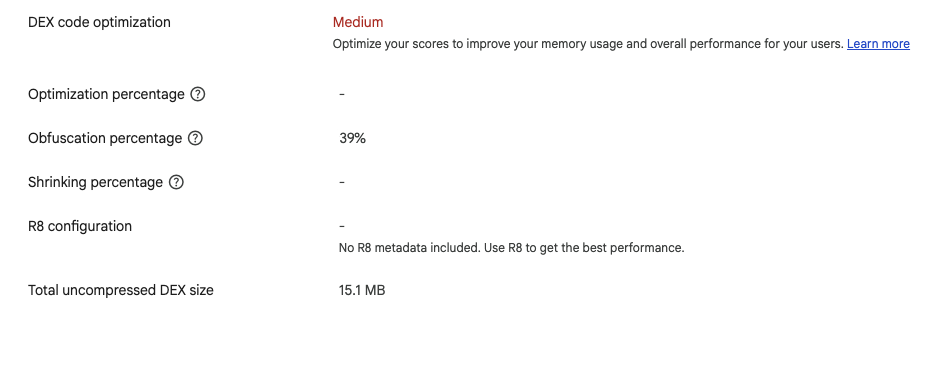
Figure 1: Example of Appdome obfuscation with R8 disabled. Google Play reports the Obfuscation percentage, while Optimization, Shrinking, and R8 configuration are unavailable.
Code Optimization and Shrinking With R8
If your app also requires code optimization and shrinking, enable R8 in your Android release build and follow Appdome’s R8 integration guidelines.
Enable R8 using:
minifyEnabled true(Groovy) orisMinifyEnabled = true(Kotlin).- Optionally, enable resource shrinking using
shrinkResources true(Groovy) orisShrinkResources = true(Kotlin).
For detailed instructions, see How to Use R8 Optimization with Appdome-Protected Android Apps.
The R8 guide explains how to configure R8 for Appdome-protected applications and provide the R8 mapping file so crash reporting tools and Google Play Retrace can correctly interpret obfuscated stack traces.
Important: The supported R8 integration workflow does not change Appdome’s existing restrictions on apps using legacy ProGuard configurations.
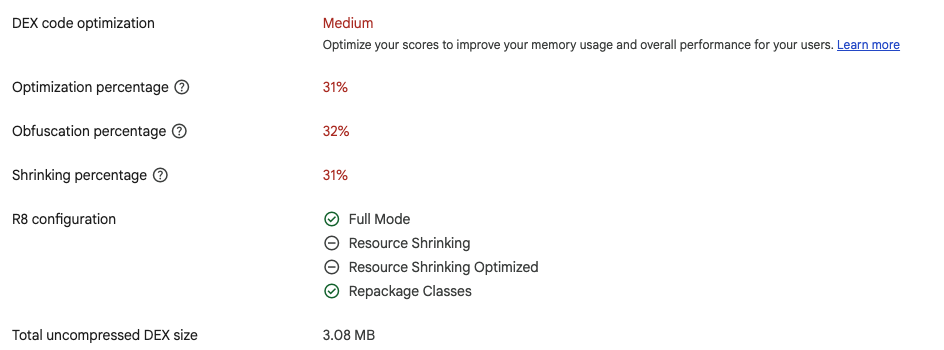
Figure 2: Example of Google Play Console reporting Optimization, Obfuscation, and Shrinking percentages for an app with R8 and Appdome enabled.
Related Articles
- How to Use R8 Optimization with Appdome-Protected Android Apps
- How to Obfuscate App Logic in Android Apps Using AI
- How to Obfuscate Kotlin Code in Android Apps
How Do I Learn More?
If you have any questions, please send them our way at support.appdome.com or via the chat window on the Appdome platform.
Thank you!
Thanks for visiting Appdome! Our mission is to secure every app on the planet by making mobile app security easy. We hope we’re living up to the mission with your project.